Some recent changes and enhancements in Rutgers Connect have been announced by OIT. Several are highlighted and described here. Please do not hesitate to contact IIS at support@rulhelp.rutgers.edu if you have questions or comments about these enhanced or new features, or anything related to Rutgers Connect.
Microsoft has added a new “Send later” feature for Outlook on the web (OWA) that allows you to schedule your messages to be sent later. This feature was previously only available in the Outlook Desktop Client. To access this feature while composing a message, navigate to the dropdown arrow beside the Send button, click on the ‘Send later’ option, and you will see a pop-up that will allow you to choose the date and time for scheduling the email. Until the message is sent, it will appear in your Drafts folder where you may change or cancel the message.
End Meetings and Appointments Early in OWA:
Already available in the Desktop Client, Microsoft is now adding the “end appointments and meetings earlier” setting to Outlook on the web. This setting allows you to end all the events you schedule earlier, with a pre-determined time for events that are under or over 60 minutes. This buffer helps you take breaks in back-to-back meetings. This can be enabled in calendar settings, under the “Events and Invitations” tab.
OneDrive File Size Increase:
Microsoft has increased the maximum size from 15GB to 100GB for files uploaded to OneDrive. For uploading very large files, Microsoft recommends using its OneDrive Desktop client.
Microsoft Teams New Meeting Experience:
Several new features have been implemented in the new Teams experience. To enable them, select your profile picture at the top of the Teams app, then Settings > General. Select “Turn on new meeting experience” and restart Teams. The new experience includes features such as pop-out meetings by default, meeting control changes, user interface changes, large gallery view (up to 49 streams), and Together mode. Detailed information about these changes can be found here.
Screen Recording Now Available in Stream:
Directly from Microsoft Stream, you can now create short screen recordings of up to 15 minutes, including your camera and microphone, without additional software. To utilize this feature, Select Create > Record screen in Microsoft Stream. More details can be found here.
View Sign-ins:
Microsoft now lets you view your sign-ins via https://mysignins.microsoft.com/. Though this information has always been logged, you can now view your own recent activity.
FindTime is an Outlook add-in that allows you to easily identify and come to a consensus on meeting times. FindTime shows you the dates and times you and your attendees are available based on the free/busy data in Outlook calendars. A poll is created within an email message which is sent to invitees who can vote on their preferred times. Because FindTime is integrated into Office 365, you no longer need to use separate applications, such as Doodle, to poll colleagues for meeting times. Invitees do not need to install FindTime to vote on meeting times, and invitations can be sent to any email address including external addresses.
FindTime works with Outlook on the Web (OWA), Outlook 2016 (desktop version), and Outlook for Mac. When using it for the first time, you will need to install the add-in and you will be prompted to sign in to authorize its use. More information on FindTime can be found here.
If you have questions about FindTime, please do not hesitate to contact IIS by phone at 848-445-5896, option 7, or by email at support@rulhelp.rutgers.edu.
Beginning on January 13, Rutgers Connect users will be able to share OneDrive files with collaborators outside of the university. Up to this point, external sharing was possible only between authenticated Rutgers Connect users.
This feature works like sharing with internal Rutgers Connect users. Anyone with access to the shared link will be able to view and edit shared files or folders based on permissions specified by the owner. More information on sharing OneDrive files and folders can be found here.
If you have any questions about OneDrive file sharing, please do not hesitate to contact IIS by phone at 848-445-5896, option 7, or by email at support@rulhelp.rutgers.edu.
There are so many ways for video/web conferencing. Why should I use WebEx?
Who: All RUL faculty and staff can initiate a WebEx call to hold virtual meetings.
What: A WebEx meeting is an online meeting that allows you to meet and collaborate with other people. Attendees will need a computer, a laptop, a mobile device with Internet access, or even just a telephone to participate. For a full experience, use a webcam with a microphone. Videoconference endpoints can also be added to the meeting.
When: WebEx is recommended for use in formal, informal, or even ad hoc situations involving small groups or large audiences, with both Rutgers employees and external participants.
Where: WebEx can be used from any location with Internet, cellular, or telephone connectivity. Most of the RUL conference rooms are equipped to participate. When conference rooms are booked or when you would like to conference from your own office, or from the road, WebEx is the solution for you.
Why: WebEx is ideal for easily connecting with internal or external participants, since invitees do not have to have any special software beyond a browser. To compliment your collaboration, Through WebEx, you can share your screen and present applications, share lectures, or co-edit documents. Meetings can be recorded through the click of a button and made available later.
How: Request the use of one of RUL’s WebEx licenses by emailing webex@rulhelp.rutgers.edu or by creating an RULHelp ticket. Bookroom also integrates the option to request a WebEx meeting when scheduling your conference location. Your local UCS, or IIS staff will then create your WebEx meeting, supply you with directions for using WebEx, and provide you with email invitations to send out to your participants. We can also provide a hands-on training session for anyone in RUL.
Once the WebEx meeting is set up, you can join from any browser using a link found in the meeting invitation. In seconds, your browser will automatically download a plugin or app (if needed) after which you will be directly connected to the meeting. When joining by phone, call the WebEx number and enter the meeting number supplied in the meeting invitation.
Want to know more? Contact IIS or your local UCSs. We are here to help!
The Rutgers University Libraries Website style guide explains the rules and conventions that go into defining typography and the appearance of website elements on our website. Its goal is to provide a cohesive and coherent experience for website users and content creators. An internal style guide has been in existence since the redesign of the libraries’ website in June 2013. However, growing demand for custom content from colleagues and requests for mini-sites, established a need to make the style guide available to users across the libraries. Not everyone knows – or should be expected to know – how to create a webpage. The style guide provides a clear idea of what to expect when, for example, you want to display tabular data or, have an article on the website that uses pull quotes. Content creators amongst our library colleagues can use it when visualizing their pages. Developers can use it as a reference when coding new pages. It functions as a common reference for both.
On a technical level, the style guide is structured such that it provides an example of the treatment of a website element, followed by the CSS code used to style the element, and the HTML code that displays it in the browser. On a general, stylistic level, it defines how pages are structured on the website, such as addressing questions regarding the appearance and location of navigational links within a mini-site. It also informs us about overarching style rules that users might be interested in knowing, such as the font family (Droid Sans) and generic typeface (sans-serif) that body copy defaults to throughout the site.
The developers and designers in Integrated Information Systems are available to create webpages that use the style guide as a guideline, rather than a limitation, with possibilities for creativity and experimentation, to build the best experience for our users and our colleagues.
How to create a calendar appointment from an email message
With so many events publicized via distribution lists like RUL_Everyone and other University-wide lists, it may be difficult to keep track of meetings, webinars, training sessions, speakers, and other events you might wish to attend. The best way to make sure you do not miss these opportunities is to add them as appointments on your Rutgers Connect calendar.
It is very easy to create an appointment on your Rutgers Connect (OWA or Outlook) calendar without having to retype the details from the email message. We have prepared step-by-step instructions to show you how.
If you have questions, or need assistance with Rutgers Connect, please contact IIS via email at support@rulhelp.rutgers.edu, or by phone at 848-445-5896, option 7.
Tracey Meyer, Information Specialist, Integrated Information Systems
Grace Agnew, associate university librarian for digital library systems , photo credit: Isaiah Beard.
Rutgers University Libraries is a key part of a team that won a $4 million grant to establish a regional data-sharing network called the Virtual Data Collaboratory. This is a huge grant that involves other departments at Rutgers University, as well as several regional university partners. We shared a press release about this initiative on our website in October, but I recently sat down with Grace Agnew who is coordinating the Libraries’ participation, to get a better sense of what it means for the Libraries and for Rutgers.
Jessica Pellien: You are part of a team that has won a multimillion dollar grant from the National Science Foundation. What is the grant for?
Grace Agnew: The grant will build an infrastructure where research data created at Rutgers and other collaborating universities can be stored, discovered, and reused. Rutgers is among the nation’s top 20 public universities in terms of obtaining research grants and number 7 among Big Ten universities, yet the university lacks a cohesive strategy for efficiently managing research data. Research data often ends up silo-ed in individual departments where it is not easily discovered and reused. Also, because we do not have a shared infrastructure that can be easily repurposed, financial and personnel resources that could be dedicated to the research itself are instead expended on duplicating infrastructure that exists in silos around Rutgers. A large scale research data infrastructure is critical for Rutgers to continue to advance as a research institution, which is part of the university’s three-fold mission.
JP: This grant involves many units at Rutgers and other regional universities. What role will Rutgers University Libraries play?
GA: The Libraries are uniquely positioned because we engage with and support Rutgers users across the spectrum, from incoming first year students to faculty members engaged in groundbreaking research. What we bring to the table is understanding and representing user needs. We are tasked with designing the data services layer which is the user-facing part of the project. Our design encompasses adding, discovering, and reusing data. We took a unique approach to ensuring the discoverability and reuse of data by designing an interface that links data with the person who created it, the tools used to analyze it, and the intermediate research products–analyses, reports, etc.–that are created around the data before the peer-reviewed publications begin. In other words, we designed a strategy that not only supports the workflow of the researcher but helps other researchers, perhaps in other disciplines, understand the context of the data and how it is used, as part of the discovery process. We will work with the lead department, Rutgers Discovery Informatics Institute (RDI2) to implement the data services layer according to our design. In addition to myself, Ron Jantz is helping to design the architecture for the data services layer and Ryan Womack will be working closely with the two use cases, the Protein Data Bank with Helen Berman, Center for Integrative Proteomics Research at Rutgers and Vasant Honavar of Penn State and with Jie Gong. Civil and Environmental Engineering at Rutgers, to ensure that the design of the data services layer meets their research and workflow needs. Other librarians involved in the data services design are Karen Estlund at Penn State and Joe Lucia at Temple University.
JP: So, what is the Virtual Data Collaboratory?
GA: The Virtual Data Collaboratory is intended, ultimately, as a “one stop shop” for the storage, discovery and reuse of data. It is immediately collaborative because we are building parallel facilities at Rutgers and Penn State. Other participating universities in Pennsylvania, include Drexel and Temple. The VDC will ultimately be available to other universities in both states through the Internet2 high speed networking facilities, KINBER in Pennsylvania and NJEdge in New Jersey. The term collaboratory references both the universities involved in the design, as well as the opportunities for collaboration that the data services layer will promote. The VDC is also designed to bridge to existing collaboratories, such as the Protein Data Bank, so much of the data in the VDC will be “virtual” because they exist in other collaboratories but are accessible via the VDC.
JP: There are existing places to store data. What will distinguish our effort from others?
GA: Other universities have collaboratories. We believe the VDC has a unique focus on both robust storage and preservation of data and a user focus on multidisciplinary discovery and reuse of data. Also, the existing places are largely single university initiatives or single discipline initiatives. They are very well designed and very supportive of their users, particularly those with a disciplinary focus. The VDC will work with existing facilities and will bring new users and increased impact from other disciplines through bridges to those facilities.
JP: You note that the VDC will integrate with other regional and national efforts. Can you paint a picture of what this actually means for your average researcher? If I am a scientist doing research on X, how would VDC help me?
GA: VDC is leveraging the technologies already funded in the NSF DIBBS initiative, so the design is inherently collaborative with other large scale data facilities. What the VDC will provide is an infrastructure that the researcher can use to ensure her data is preserved, is accessible, and can be analyzed and reused by the researcher and by others. Currently, researchers at Rutgers have to build an infrastructure according to granting agency requirements to ensure that data is preserved and made openly available to others or they can deposit in disciplinary repositories. Once deposited in a disciplinary repository, the researcher generally cannot continue to work with the data, unless the data is downloaded for use. VDC is envisioned as a workflow-oriented repository with a suite of tools for reusing data and the ability to store and link data products, such as analyses, which otherwise reside on the researcher’s local server or desktop. So the VDC is somewhat unique in designing full integration in merging storage and working space for the active scientist.
JP: Will faculty and researchers at non-participating universities have access to the VDC?
GA: It is open to everyone for discovery of data. I don’t think policies for membership in the collaboratory have been developed yet. Membership enables you to upload your data, use tools, etc. The Advisory Board will assist with the development of policies for membership.
JP: When will the VDC be available?
GA: This is a four year grant that began in September 2016. The goal is to use agile methodologies to build a prototype and layer on functionality, so hopefully there will be something real to show early in 2018.
So there you have it, the team behind the VDC is already hard at work. Currently, their focus is on designing a collaboratory for sciences, though Grace was quick to point out that social sciences and humanities wouldn’t be turned away if they were interested.
When it is completed, the VDC will meet or exceed requirements for open access data management by granting agencies and will be a tremendous accomplishment for Rutgers.
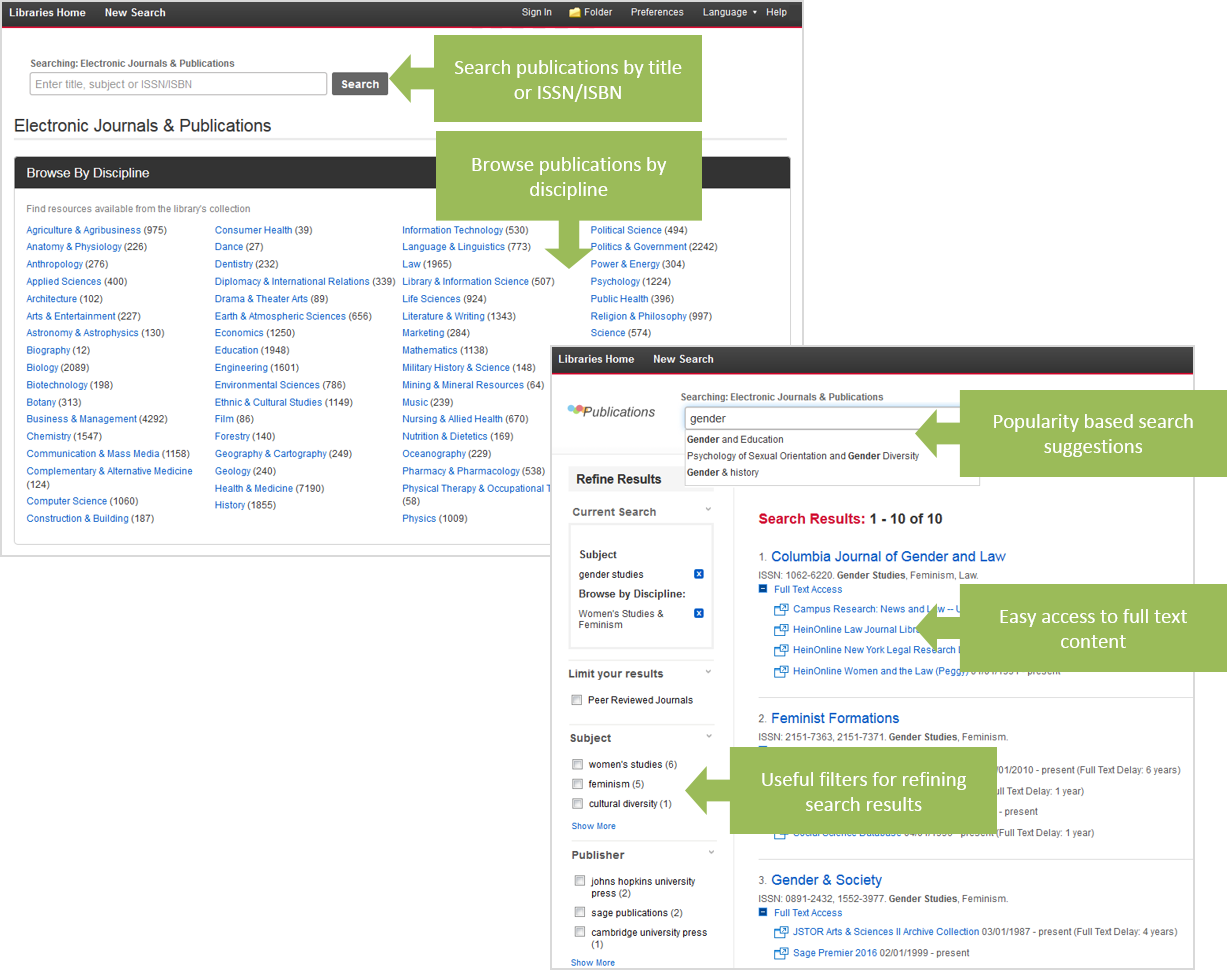
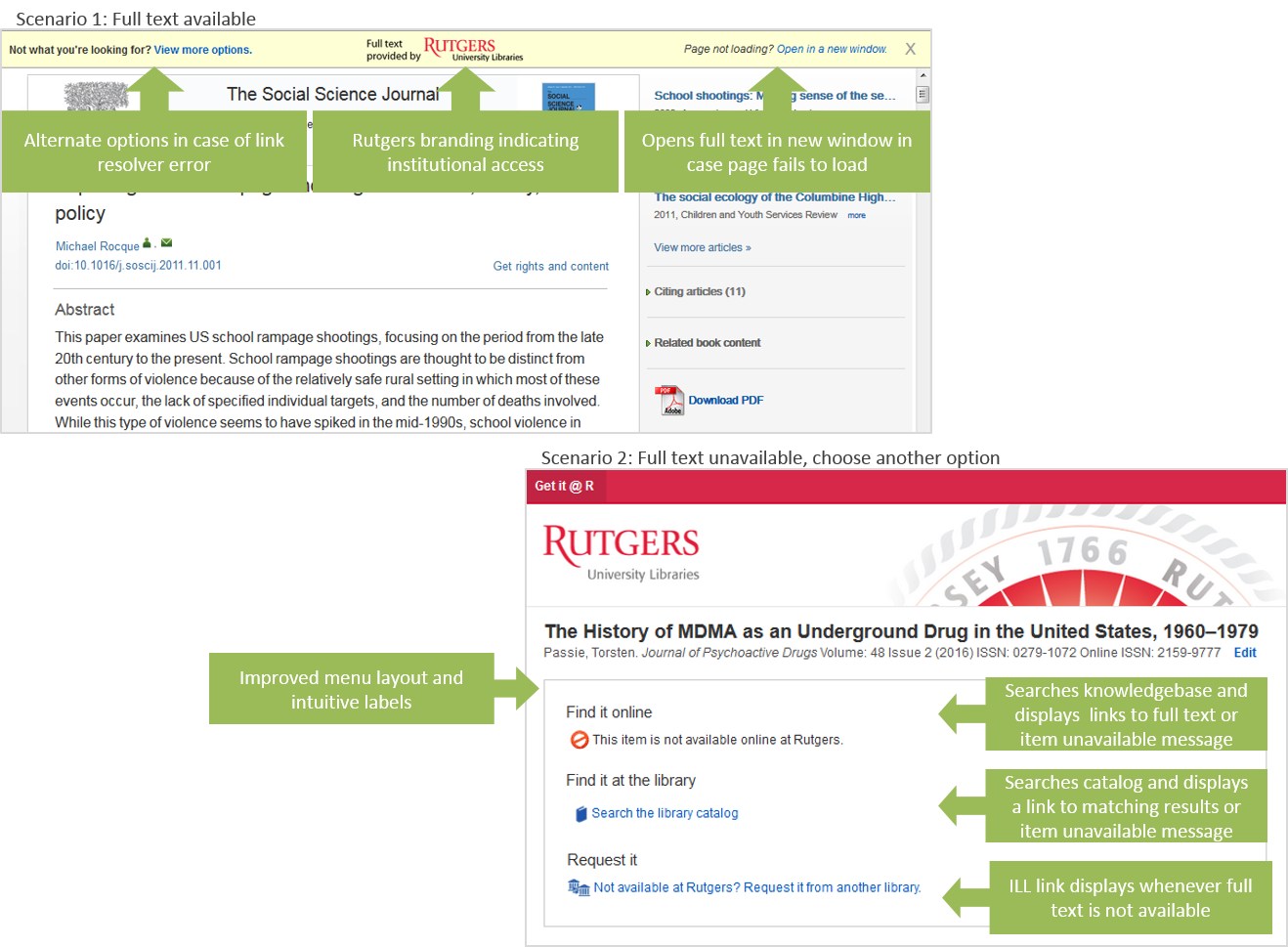
On August 18 the Libraries upgraded to Full Text Finder, EBSCO’s newest holdings and link management tool designed to replace its A-to-Z and LinkSource services, which are being phased out. A-to-Z is the product that powers the Libraries’ electronic journals search. LinkSource is the product that powers its link resolver service (locally known as “Get it @ R”). You may notice some changes to these interfaces. Below is a quick summary of what to expect.
The new e-journals search interface is a little cleaner, better organized, and offers a variety of new features including:
Responsive autocomplete to facilitate known title searching
Discipline-specific browsing to help users identify titles in their subject area
Filters to refine results by subject, format, or publisher
Click to enlarge.
The new link resolver menu has been streamlined to help users determine the availability of an item faster, more efficiently, and with less confusion. New features include:
Improved menu layout and design
Intuitive labels and icons
Real-time catalog lookup for print holdings
Fail-safe options in case of link resolver error
Click to enlarge.
Please be sure to update any guides or tutorials that refer to these products. Links to the old A-to-Z Journals and Citation Linker pages have automatically been updated in LibGuides, but you may want to double check your guides just to be sure.
As with any software migration, you may notice some irregularities as we work to resolve temporary glitches. If you have any questions or wish to report a technical problem, please contact serials@rutgers.libanswers.com.
Special thanks to the Serials Team for their work migrating our holdings data as well as the Web Team for their help customizing the design of the interface.
Most of you have, by now, visited the Rutgers Connection Migration Support website. I hope you are finding a lot of useful information there, but if anything is missing, please let us know using the Submit Your Questions form. This story is meant to update everyone on the newest pieces of the migration plan. Most importantly, to let you know that everyone’s email in Rutgers University Libraries will be migrated August 23–25, 2016. The exact grouping will be worked out in collaboration with AULs and library directors.
Kickoff meeting:
A successful kickoff meeting was held on Friday, July 22, with four representatives of OIT, all UCSs; and all IIS staff, joined by a special Migration Representative from the Health Sciences Libraries. A four-hour recording of that discussion is available with RUL NetID authentication–but you are hereby warned: It is heavy on technical jargon! Unless you want to delve into every detail, you would be better off perusing the support site and attending the upcoming information sessions and subsequent training.
Prepping for the migration:
But first, as the most important part of preparations, we must collect information about all existing accounts, as only one account per Rutgers employee can be migrated automatically. Content from other accounts should be first transferred to the primary account, or migrated later.
For this purpose, IIS has developed an instrument with half a dozen questions and a lot of help on how to respond to them. Please use your NetID to log in (each RUL member needs to fill it out personally or with the help of their UCSs) and provide the required information about the Rutgers email accounts you currently hold. The more accurate the data we receive, the more efficient and more painless the migration will be.
Since the new email and calendaring tools will appear quite different from what Zimbra users are used to, IIS will offer a series of 90-minute information sessions August 8–19 in several libraries covering all three geographic regions. The schedule for these sessions will soon follow via RUL_Everyone messages, and will be available on the support site’s calendar by August 5.
The plan for the migration:
All three hundred email users at RUL will be migrated over a three-day period August 23–25. Groups of account holders will be scheduled for each day based on organizational, geographic, and logical criteria. When you come to work on your assigned day of the migration, all your email and calendar appointments will be ready for you in the new system. You can immediately access them and continue working with them in the new interface called OWA (Outlook Web Access) by logging in through any browser using the link connect.rutgers.edu and your new email address [NetID]@libraries.rutgers.edu. (Please see details about account names in the Questionnaire and at the support site.)
Throughout the days of the migration, IIS staff and UCSs will be “roaming the halls” in the libraries to help users access their mailboxes using the client of their choice: The desktop version of Microsoft Outlook, available on every RUL workstation, is the preferred client for work in the office, while any browser may be used to log into OWA away from your desk.
Training opportunities:
Two-hour-long introductory, instructor-led, classroom-based, hands-on training will be offered in several sessions over two days of the migration. If you cannot make it during those days, the training sessions will come back after Labor Day, including more advanced training later on. Individual introductory sessions will also be available for those who learn best that way. Please check back to the support site’s calendar around August 15 for the exact schedule and to sign up.
In the first wave of training sessions we will focus on the communication tools included with Rutgers Connect (which is, as you know, a customized version of Microsoft’s Office 365 running in the Microsoft cloud): OWA (and Outlook on the desktop), Calendar, People, Tasks, OneDrive for Business (cloud-based file storage), and Skype for Business. But the rest of the Office 365 tools will also be immediately available to everyone from the same online interface: Word, Excel, PowerPoint, and OneNote. At the same time, the respective applications can be downloaded and installed on your home computer and mobile devices, while you will have them installed on your RUL desktops in the Office 2016 version that is fully interchangeable with the cloud-based apps.
Questions or concerns:
Much more information will continue to become available as we approach the migration week. In the meantime, please let IIS know of any concerns or questions you might have by writing to support@rulhelp.rutgers.edu or using the support site’s Submit Your Questions form.
As many in the Libraries have already heard, the university has started the migration of faculty and staff email and calendaring to a unified system, called Rutgers Connect, in the Microsoft Cloud using Office 365. The Libraries are scheduled to migrate in Phase 2, sometime between June and August of 2016, but we are still working with colleagues in the Health Sciences Libraries to determine whether they will be part of the Libraries’ migration, or remain part of RBHS, which is scheduled to migrate in the ongoing Phase 1.
There is plenty of good news to look forward to, even if some effort will be required from everyone in the course of the migration:
Uniform availability anytime, anywhere, of mail, calendar, and the basic Office 365 applications on any platform: Windows, Mac as well as tablets and smart phones of all three flavors (Android, iOS, and Windows)
The Office 365 cloud-based suite offers all major productivity apps: Word, Excel, PowerPoint, Outlook, and OneNote, which will also be available in desktop versions
The email/calendaring client, called Outlook, including Tasks and Contacts (now called People), and its Web-based version, called OWA (for Outlook Web Access), offer each user 50 Gigabytes of mail storage – an order of magnitude higher than what is currently available
In addition to the large mail quota, each user will get 1 Terabyte of shareable file storage for collaboration (similar to Google Docs) on Microsoft OneDrive that will show up in your Windows Explorer (now called File Explorer in Windows 10; had been called File Manager before 2000) as just another “drive”
In addition, Rutgers Connect includes access to Skype for Business for everyone
More collaboration tools (like SharePoint) will be probably added in 2017
The Rutgers Office of Information Technology (OIT) has contracted a third-party integrator, Comparex, to help with the migration. They will provide webinar-based instruction and tutorials for the use of the entire Office 365 suite. The Libraries’ own Integrated Information Systems (IIS), together with the Libraries’ Unit Computing Specialists, will provide local, customized help in transitioning from Zimbra to Outlook.
As part of the transition to Office 365, our email addresses will change from “@rulmail.rutgers.edu” to the more intuitive “@libraries.rutgers.edu.” To prepare for this change, everyone is encouraged to set up a Rutgers-wide alias in the form of [firstname].[lastname]@rutgers.edu, and have it point to the current @rulmail.rutgers.edu address. (This can be done now by each user on their own, or IIS can help with the rather simple process that takes but a few minutes.)
Much more information will follow in the coming weeks and months as IIS prepares the support infrastructure for everyone to use. We will have a Communications Plan and a Support Website (just like for the Zimbra transition in 2011) with all relevant information, so you won’t have to search several Rutgers sites for every detail. The final migration plan itself will be worked out together with representatives of OIT and Comparex about one month before the actual date.
Here are a few pointers to alleviate early concerns:
The current @rulmail.rutgers.edu addresses will forward incoming mail to our new accounts for one full year after migration (without the possibility of logging into the old account) – so that people will have plenty of time to adjust their external list subscriptions.
All internal lists will be migrated and/or updated manually by IIS, or support will be provided for lists that we don’t have access to.
Since all Rutgers Faculty and Staff domains will “trust” each other, it will be easy to find anyone in the global directory, and to sign up for lists from other departments.
Please look for a lot more information coming to your mailboxes as we move closer to the migration period. It is a good idea to take the online webinars close to the migration date (so as not to forget everything by the time you need to use the new apps). In the meantime, please let IIS know of any concern or question you might have at support@rulhelp.rutgers.edu and, in a few weeks, at the support website.


 Beginning on January 13, Rutgers Connect users will be able to share OneDrive files with collaborators outside of the university. Up to this point, external sharing was possible only between authenticated Rutgers Connect users.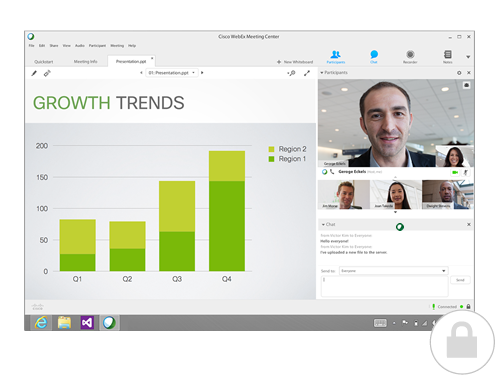
 There are so many ways for video/web conferencing. Why should I use WebEx?