Author: Joseph Deodato

  • Realigning Library Services to Scale Research Support

    close-up of a hand holding research notes on top of a desk
    The Research Support Services group was formed to coordinate the development and delivery of library services that support research across the life cycle.

    In 2022, Rutgers University Libraries embarked on a comprehensive review of their organizational structure with the goal of improving operational efficiency, clarity, and communication. Part of this process involved the identification of service areas that could benefit from greater system-wide coordination and support. One of those areas was research support, which encompasses a broad range of specialized, high-touch services such as managing research data, conducting systematic reviews, and evaluating research impact.

    While traditional services like reference and borrowing have been centrally coordinated for years, research support evolved much more opportunistically in response to local needs, resources, and expertise as well as rapidly changing technologies, funding expectations, and modes of scholarship. While this approach allowed for the development of responsive and innovative services, it also led to inconsistencies in quality, coverage, and integration. It therefore became necessary to explore ways of scaling these services to meet growing demand across the university and ensure their sustainability.

    To help address this challenge, the Research Support Services (RSS) group was formed in the fall of 2025 to coordinate the development and delivery of library services that support research across the life cycle. Under the direction of the coordinator for research support services, this group is responsible for providing training, outreach, and support to researchers on topics such as:

    • Artificial intelligence
    • Copyright
    • Evidence synthesis
    • Open access
    • Research data
    • Researcher identity and impact
    • Scholarly publishing

    Reporting to the associate vice president for campus libraries, the goals of RSS are to:

    • Support researchers at all stages of the research life cycle, from project design to publication and beyond
    • Increase campus awareness and use of library research support services
    • Build capacity among library faculty to provide specialized research support
    • Foster a culture of open, ethical, and impactful scholarship
    • Continuously evaluate and adapt services to emerging research needs and trends

    RSS is composed of library specialists across the Libraries and organized in the following teams:

    Artificial Intelligence

    Members: Katie Anderson, Joanne Dera, Triveni Kuchi, Mei Ling Lo, Jonathan Torres, Sonia Yaco, Yingting Zhang

    Supports researchers in understanding how to use and responsibly integrate artificial intelligence (AI) tools into their research workflows, including guidance on:

    • Identifying and evaluating AI tools appropriate for research
    • Writing effective prompts, evaluating outputs, and documenting use of AI
    • Understanding the technical limitations and ethical implications of AI
    • Ensuring ethical and transparent AI use in compliance with academic integrity, intellectual property, and data privacy standards

    Evidence Synthesis

    Members: Matthew Bridgeman, Maria Deptula, Bart Everts, Mina Ghajar, Pam Hargwood, Samantha Kannegiser, Mei Ling Lo, John Maxymuk, Stephen Modica, Yingting Zhang

    Supports researchers in performing scoping, systematic, and other structured literature reviews, including guidance on:

    • Formulating a viable research question
    • Choosing an appropriate review methodology
    • Selecting relevant databases
    • Developing an effective search strategy

    Research Data

    Members: Francesca Giannetti, Triveni Kuchi, Laura Palumbo, Susan Oldenburg, Jonathan Torres, Ryan Womack, Sonia Yaco, Yingting Zhang

    Supports researchers in collecting, analyzing, documenting, and sharing research data, including guidance on:

    • Finding and accessing specialized datasets
    • Using data analysis and visualization tools
    • Creating data management plans
    • Selecting a repository for data sharing

    Researcher Identity and Impact

    Members: Joanne Dera, Mei Ling Lo, Jonathan Torres, Yingting Zhang

    Supports researchers in promoting their scholarly work and evaluating its reach, influence, and engagement, including guidance on:

    • Creating researcher profiles and identifiers
    • Interpreting bibliographic metrics like citation count, impact factor, and h-index
    • Using bibliographic tools to perform citation analyses
    • Using scholarly networking tools to promote their research and identify potential collaborators

    Scholarly Publishing, Open Access, and Copyright

    Members: Jeffrey Carroll, Maria Deptula, Rhonda Marker, Janice Pilch, Zara Wilkinson, Yingting Zhang

    Supports researchers in navigating the complex landscape of scholarly publishing, open access, and copyright, including guidance on:

    • Identifying reputable, high-impact journals for publication
    • Understanding author rights and negotiating publisher agreements
    • Identifying funding for article processing charges (APCs)
    • Ensuring compliance with funder and institutional open access policies
    • Navigating copyright and licensing issues

    Each team has a designated team representative who serves as a member of the RSS Steering Committee, which meets monthly to coordinate the delivery of research support services across libraries, develop standardized policies and best practices, and act as the primary decision-making and strategic advisory body for RSS. Additional information, including the group’s charter and meeting minutes, can be found on the staff website.

    To support this exciting work, a new Research queue has been created in LibAnswers. The queue can be used to direct questions on any of the aforementioned topics to the appropriate library specialists. Patrons can also send their questions directly to the queue by emailing ask_research@libraries.rutgers.edu.

    Library faculty and staff interested in learning more about the work of RSS are invited to attend an information session to be held in early spring. Details will be distributed via email. In the meantime, feel free to send any questions to me at jdeodato@rutgers.edu.


  • SOAR Staff Acknowledged in Cancer Research Communications Journal

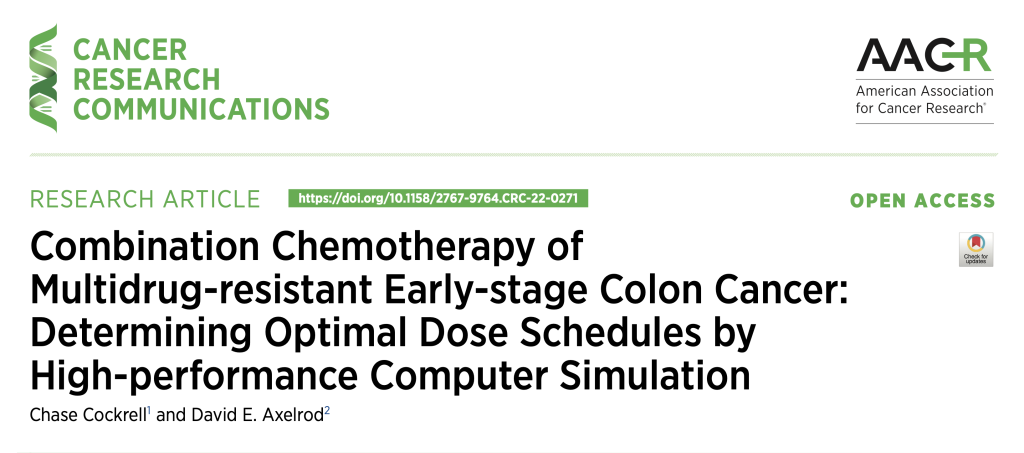
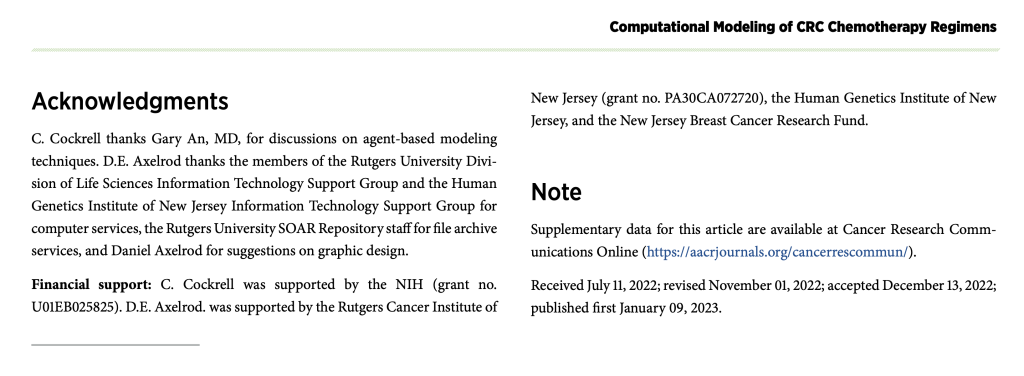
    Rutgers University Libraries’ SOAR staff received a published acknowledgment in the January 2023* issue of Cancer Research Communications. Kudos to Geoff Wood, metadata librarian for Scholarly Communication and Collections, for helping author David Axelrod archive the supplementary data for his article in SOAR. We are pleased to see the Libraries recognized for their contributions to faculty research.

    Cancer Research Communications Journal Cover - 010923

    Cancer Research Communications Journal - SOAR Acknowledgment - 010923

    *Cockrell, C. and D.E. Axelrod. (2023). Combination chemotherapy of multidrug-resistant early-stage colon cancer: determining optimal dose schedules by high-performance computer simulation. Cancer Research Communications, 3: 21-30. https://doi.org/10.1158/2767-9764.CRC-22-0271

    About Cancer Research Communications

    Cancer Research Communications is an open-access peer-reviewed journal encompassing the full spectrum of cancer research.

    About SOAR

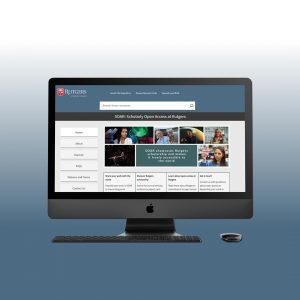
    SOAR (Scholarly Open Access at Rutgers) has been developed as a convenient website where Rutgers scholars can deposit their work and access further information about open access. Rutgers authors deposit legal copies of scholarly articles into SOAR at the time of the article’s final acceptance for publication, at no cost to them, making scholarship freely accessible to readers and researchers worldwide on the Internet. SOAR staff will research all permissions for you at the time of deposit. SOAR is crawled by Google and ensures access over time. Once it’s deposited, you’ll receive a permanent link for your article that you can use on your website, CV, courseware, and for social networking.

  • Ex Libris Implementation Team Update – January 2021

    The new SOAR platform improves the capture and discovery of Rutgers research outputs.

    The new SOAR research portal, powered by Esploro, is now live and can be accessed at soar.libraries.rutgers.edu. Esploro helps advance SOAR’s mission to promote Rutgers scholarship by improving and extending our ability to collect and manage institutional research outputs.

    Benefits of the new platform include:

    • Simple, streamlined deposit of research outputs
    • Integrated workflows for reviewing, approving, and managing deposits
    • Support for over 50 resource types including articles, book chapters, conference proceedings, presentations, datasets, and creative works
    • Automated capture of metadata from major scholarly publishers and indexes
    • Automatic DOI registration for persistent identification and access
    • Powerful analytics for tracking and measuring research impact
    • A robust global infrastructure to ensure reliable and continuous availability

    Additional enhancements are planned over the course of the next year that will further augment SOAR’s ability to capture publication data and provide a richer, more comprehensive picture of research activity at the university.

    Please help us spread the word about SOAR to the Rutgers community. To facilitate this process, an outreach toolkit has been prepared and is available for download on the Staff Resources website at staff.libraries.rutgers.edu/communications/soar-esploro-outreach-materials. Inside, you will find resources including an email template, slide deck, flyers, known issues list, and other materials to help you communicate this change to your local users and stakeholders. For a brief introduction, watch Getting Started with SOAR.

    Please note that all previously deposited assets have been migrated to the new platform and remain accessible via their assigned DOI. The following services previously offered through SOAR have been discontinued:

    • “My Bibliography Link” – a shareable link to your personal collection of deposited works in SOAR
    • “Faculty Survey Portal” – a custom portal allowing researchers to search your collection of works in SOAR

    Last, but not least, I’d like to acknowledge the tireless work and dedication of the Esploro Working Group for getting this project off the ground (Kalaivani Ananthan, Marty Barnett, Abbey DiPaolo, Rhonda Marker, Chad Mills, and Geoffrey Wood) as well as the various colleagues who provided guidance and support along the way (Laura Mullen, Yingting Zhang, Amy Kimura, Sam McDonald, Dave Hoover, and Matt Badessa).

    Please take some time to check out the new SOAR site and send any questions or comments to soar@rutgers.libanswers.com.

  • Ex Libris Implementation Team Update – May 2020

    Rutgers students, faculty, and staff can now access over a million digitized texts available through HathiTrust’s Emergency Temporary Access Service (ETAS). In response to the current public health crisis, HathiTrust is providing member libraries with temporary access to digital versions of print titles that would otherwise be inaccessible due to library closures. As a result, the Rutgers community now has online access to over 1.2 million volumes previously only available in print. This is in addition to the more than 6 million public domain and Creative Commons-licensed works already accessible through HathiTrust.

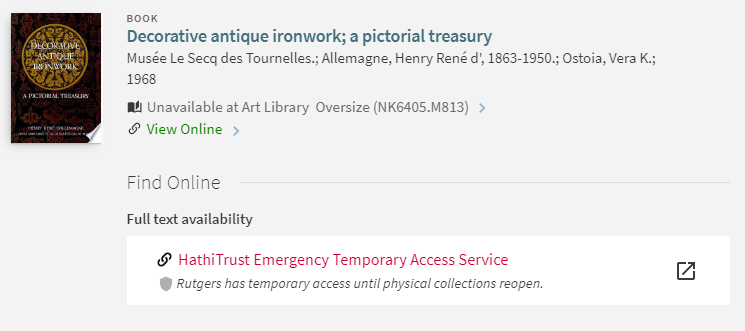
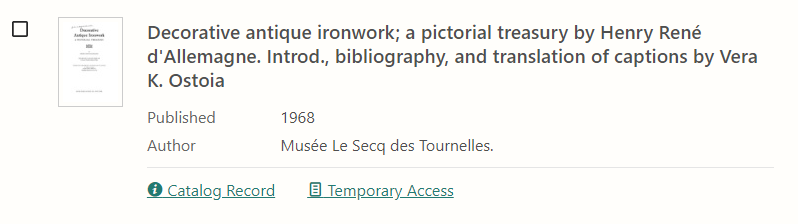
    Rutgers users can search for these titles in QuickSearch or the HathiTrust Digital Library. Books available through ETAS include a note indicating temporary access.

    View in QuickSearch.
    View in HathiTrust.

    Terms of service

    • “Temporary Access” books require NetID login and can only be accessed by Rutgers students, staff, and faculty.
    • “Temporary Access” books can be read online only. Unlike “Full View” books in HathiTrust, they cannot be downloaded for offline reading.
    • “Temporary Access” books can be checked out for one hour. The banner at the top of the browser informs you how long the book is checked out to you. Your access to the book will automatically renew as long as you are actively reading it.
    • If the book you want is currently checked out, a message will display letting you know that the book is in use. Check back later to see if the book has been returned. Unfortunately, it is not possible to request or place a hold on a book. Because access is limited, users are encouraged to return books as soon as they are done using them.
    • “Temporary Access” books will only be available online until access to the Libraries’ print collection is restored.

    For more information, including instructions for accessing ETAS books on your mobile device, see https://www.hathitrust.org/ETAS-How-To


  • Ex Libris Implementation Team Update – January 2020

    As you know, the Ex Libris Implementation Team has been working with the Law Libraries since May on a project to migrate their data to Alma and merge their library catalog with ours. During the week of January 6, we will begin the final steps of this migration. To help you navigate this transition, below are answers to some frequently asked questions about the project. If you have additional questions, please send them to the Ex Libris Implementation Team at exlibris@rutgers.libanswers.com.

    Q: When are the Law libraries expected to migrate to Alma?

    A: The migration is expected to be completed on January 10, 2020.

    Q: Will any services be disrupted or temporarily unavailable during the migration?

    A: No, Alma and Primo are expected to remain fully operational during the migration.

    Q: Will the collections of the Law libraries be discoverable in QuickSearch?

    A: Once migration is complete, all materials currently represented in Law’s library catalog will be discoverable in QuickSearch. Law patrons will also be able to access these resources through a separate custom view designed specifically for the Law School. Additional work is required to create and configure Law’s electronic resources. It will take up to 24 hours after go-live for all of Law’s electronic resources begin appearing in QuickSearch. Because this configuration must be done in our live production environment, users may experience intermittent access issues during this time.

    Q: Can Law’s circulating collections be borrowed or requested by non-Law School patrons? Are the loan policies the same?

    A: Yes, circulating materials can be borrowed or requested by any Rutgers user. To make borrowing between the libraries easier, loan polices have been made uniform.

    Q: Are there any resources that are restricted to Law patrons only?

    A: Yes, certain electronic resources (such as Westlaw, Lexis, and Bloomberg) are restricted to Law patrons only. Access to these resources is only available from a Law School IP address, via the Law School proxy, or with an assigned username and password. These resources will be visible to all QuickSearch users with a note indicating that access is restricted to Rutgers Law School students, faculty, and staff [view example]. To maximize visibility of this note, direct linking will be deactivated for all Law-restricted resources.

    Q: Will the Law migration result in duplicate records?

    A: Yes, you may see some duplicate records initially. There are plans to identify and remove duplicate records post go-live.

    Q: Where should I refer Law-specific reference and borrowing inquiries?

    A: Please direct patrons to contact the appropriate Law library:

    Camden Law
    Reference (856) 225-6173
    Circulation (856) 225-6172
    lawlib@camden.rutgers.edu
    Newark Law
    Reference (973) 353-5676
    Circulation (973) 353-5677
    refdesk@law.rutgers.edu
    Q: Who should I contact if I have additional questions?

    A: Please send questions or comments to the Ex Libris Implementation Team at exlibris@rutgers.libanswers.com.


  • Ex Libris Implementation Project Update – September 2019

    quicksearch logoAs we embark on a new academic year, we thought it would be a good time to let you know about some improvements coming to QuickSearch. Below is a summary of some of the major enhancements that Ex Libris plans to introduce in 2019-2020.

    Central index

    In Q1 2020, Ex Libris plans to release a new and improved central index. Leveraging the combined assets of its Primo and Summon indexes, Ex Libris’s new, unified Central Discovery Index (CDI) promises expanded content coverage, faster updates, improved deduplication, and better result filtering. In addition to providing an improved search experience for users, the new central index also offers better integration with Alma, making it easier to administer and maintain. 

    Related items

    As part of its effort to build a bigger and better central index, Ex Libris is also developing a graph database that will allow users to explore connections between related items. For example, a record for a book will soon have links to reviews of that book and the individual chapters contained within, creating additional opportunities for exploration and serendipitous discovery.     

    Browse journals by subject

    The Journal Search page will be enhanced to allow users the option to browse journals by subject. Subject categories will be based on Library of Congress Classification and offer researchers an easier way to identify and locate journals in their area of study. 

    Enhanced personalization

    Users will be given more control over their search experience with customizable preferences, including the ability to configure their preferred library, sort order, and number of results per page. 

    Bulk actions

    Currently, actions such as save, email, and export can only be applied to records individually. However, users will soon have the ability to perform these actions in bulk on a set of records. They will also have the option to export search results to Excel or CSV.

    Be on the lookout for more information about these enhancements as they are released. As always, if you have any questions or would like to report an issue with QuickSearch, please email the Ex Libris Implementation Team at exlibris@rutgers.libanswers.com. You can also use the “Report a problem” link in QuickSearch. For more information on how to use QuickSearch, visit QuickSearch Help or check out our QuickSearch tutorial videos.

  • Ex Libris Implementation Project Update – November 2018

    quicksearch logoAs we reach the midpoint of the semester, the focus of the Ex Libris project has begun to shift from planning and implementation to maintenance and support. Since its formation, the team has received close to 700 questions, comments, and suggestions on issues ranging from access and authentication to resource management and user interface design. Approximately 75% of tickets were answered in under 12 hours (40% were answered in under 10 minutes!). Thanks to feedback from library users and staff, the team has continued to make improvements to QuickSearch. Some highlights since the last update include:

    Improved journal searching
    Relevance ranking of one-word journal titles (Nature, Science, Cell, etc.) has been improved, making these publications easier to locate using the Journal Search option

    Browse options restored
    The ability to browse library materials by title, author, and subject has been restored. (These options were disabled at the start of the semester due to a software bug.)

    Can’t find what you’re looking for?
    Suggestions have been added to the bottom of the search results page to help users improve or expand their search. Suggestions vary depending on the type of search performed and include links to external borrowing services such as E-ZBorrow and Interlibrary Loan.

    System alerts
    System alerts have been added to allow for improved communication of service disruptions and outages.

    Improved facet and summary holdings display
    The formatting of long facets and summary holdings statements has been improved by allowing them to wrap to the next line instead of truncating them.

    Next/previous record
    When viewing a record, users can navigate to the next or previous record without having to return to the search results page.

    Translation of foreign language serial titles
    English translations of foreign language serial titles now appear in the main title entry of the brief and full record display.

    Firefox bug fix
    There was a bug in Firefox that produced different results depending on whether a search was executed by clicking the search button or pressing enter. This has been fixed.

    Since going live in June, QuickSearch has clocked over 470,000 sessions and handled roughly 850,000 queries. Though transaction logs are useful for measuring usage, they don’t tell us how well a product meets the needs of its users. That’s why, in November, we’ll be conducting a universitywide usability study to learn more about how library patrons use QuickSearch. Students and faculty from all four campuses have been invited to participate and share their thoughts on the new interface. Findings from the study will be used to guide further enhancements to QuickSearch and improve the overall user experience.

  • Introducing Full Text Finder

    On August 18 the Libraries upgraded to Full Text Finder, EBSCO’s newest holdings and link management tool designed to replace its A-to-Z and LinkSource services, which are being phased out. A-to-Z is the product that powers the Libraries’ electronic journals search. LinkSource is the product that powers its link resolver service (locally known as “Get it @ R”). You may notice some changes to these interfaces. Below is a quick summary of what to expect.

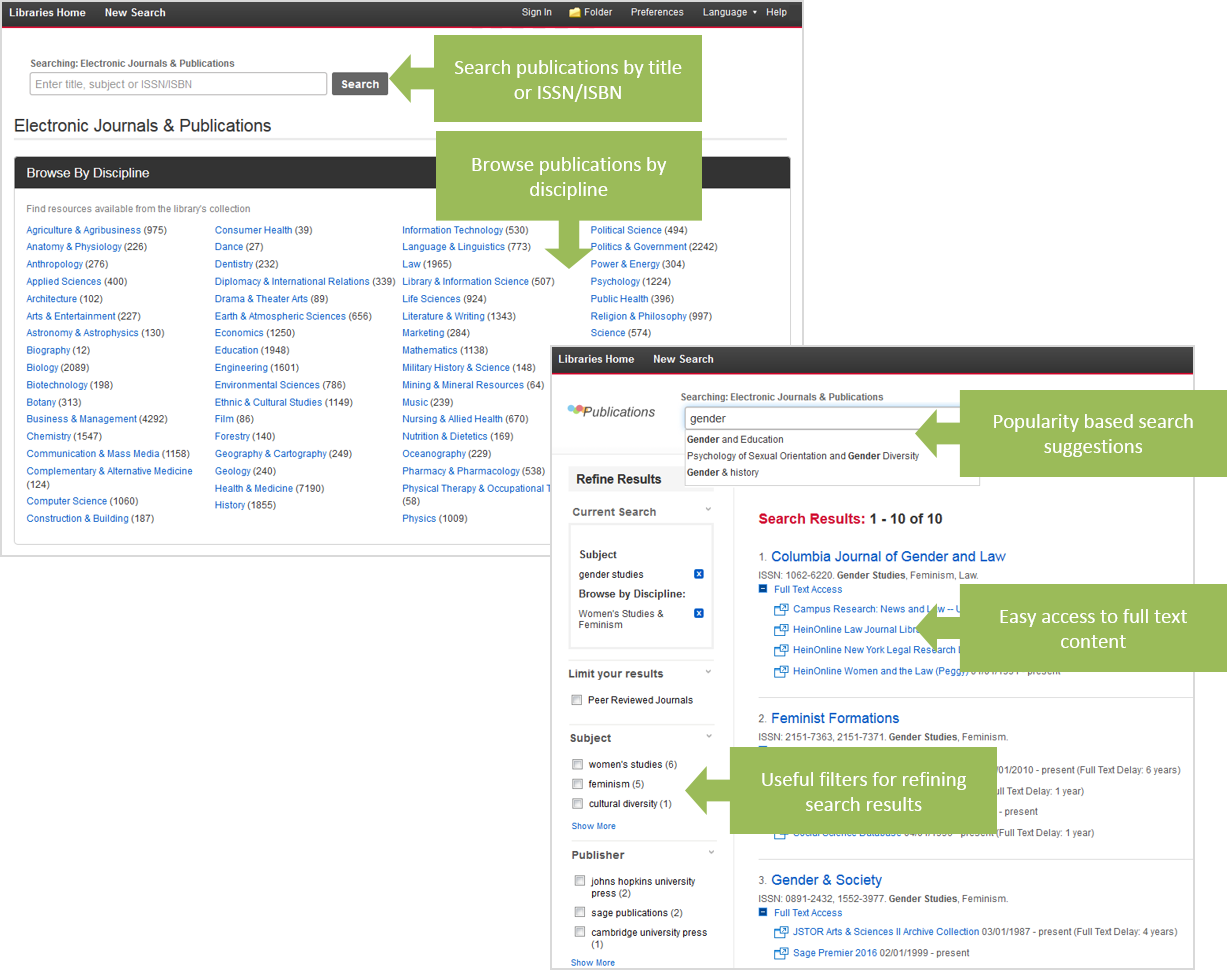
    The new e-journals search interface is a little cleaner, better organized, and offers a variety of new features including:

    • Responsive autocomplete to facilitate known title searching
    • Discipline-specific browsing to help users identify titles in their subject area
    • Filters to refine results by subject, format, or publisher
    figure1
    Click to enlarge.


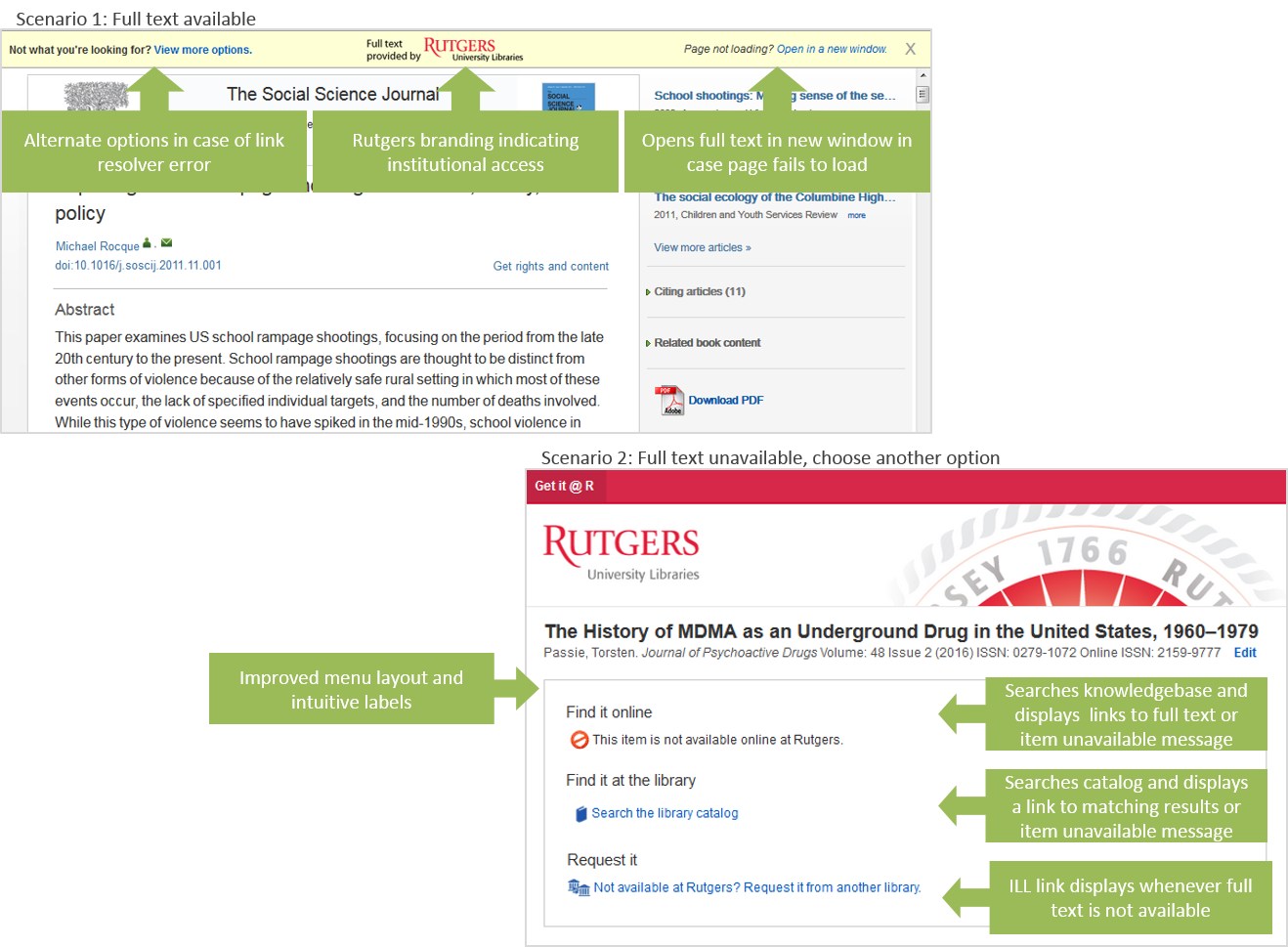
    The new link resolver menu has been streamlined to help users determine the availability of an item faster, more efficiently, and with less confusion. New features include:

    • Improved menu layout and design
    • Intuitive labels and icons
    • Real-time catalog lookup for print holdings
    • Fail-safe options in case of link resolver error
    figure2
    Click to enlarge.

    Please be sure to update any guides or tutorials that refer to these products. Links to the old A-to-Z Journals and Citation Linker pages have automatically been updated in LibGuides, but you may want to double check your guides just to be sure.

    As with any software migration, you may notice some irregularities as we work to resolve temporary glitches. If you have any questions or wish to report a technical problem, please contact serials@rutgers.libanswers.com.

    Special thanks to the Serials Team for their work migrating our holdings data as well as the Web Team for their help customizing the design of the interface.

  • 5 Things to Know about the New RefWorks:

    5 Things to Know about the New RefWorks:

    refworks jpg

    1) ProQuest is merging RefWorks and Flow into a single platform known as the new RefWorks. Flow users have automatically been moved to the new platform. RefWorks users can choose to upgrade by logging into their account and clicking “Move to the newest version of RefWorks.”

    2) Notable features of the new RefWorks include the ability save references and full text with the click of a button, automated recognition of uploaded documents, auto-completion of references, integration with Google Docs and Dropbox, and built-in document reading, highlighting, and annotation.

    3) The old RefWorks platform is scheduled to be retired by January 2018. However, Rutgers users will be migrated to the new platform some time before then. The exact date has yet to be determined. Until then, Rutgers users will continue to have access to both versions of RefWorks.

    4) Although it offers many new features, the new RefWorks does not have all of the same features as the old RefWorks. Features that are currently not available include support for multiple file attachments, public sharing, folder-level deduping, and global citation editing. The new RefWorks is also not fully compatible with older versions of Internet Explorer as well as Microsoft Word for Mac 2016. ProQuest continues to add features and functionality to the new RefWorks and aims to have full parity by late 2016.

    5) For more information see the RefWorks FAQ on the library website or the Upgrade FAQ on the RefWorks support site.