Category: Department

  • Creating Homemade PPE

    I would like to share my experience during these difficult days of our quarantine to fight against COVID-19.

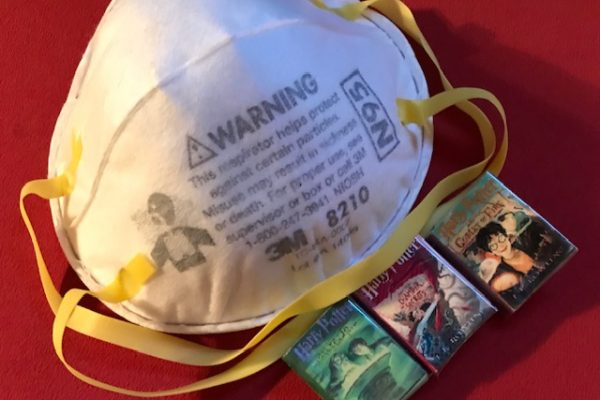
    While all of us are working from home, the medical staff are on the front line fighting the virus while lacking the PPEs. This became a great concern in my family, when my daughter called me three weeks ago, and asked if I could make some masks and head covers for her husband, who is a doctor, and also her doctor friends who are taking care of COVID-19 patients.

    She did some research how to make safe cloth masks for medical staff to place over the N95 masks to make them last longer. Pretty quickly, we figured out how to make them out of cotton fabric and flannel while using different filters. I used any item possible at home: T-shirts, cotton sheets, cotton tablecloths, bags, baby wipes, laundry softeners, vacuum cleaner filters. I also made head covers out of shower curtains while sending her all transparent plastic available at home so she could use it to make face shields, helped by her friend who made parts of them by 3D printing. She was able to make 30 face shields.

    My daughter and I also started a campaign on social media, asking people to make masks and sharing the instructions, suggesting they donate them to the community. The social media network in New York, Connecticut, and New Jersey was able to make 350 masks and donated them to hospitals and friends. My daughter, who is also a doctor, for about a month never stopped raising awareness on social media that everyone needs to wear a mask when we go out.

    I shared my experience with the Smith Library access services staff and shared guidelines about how to make masks. I will continue to make cloth masks and head covers until the pandemic is over. Doing something good for the community helps me release the stress and be happy that I can do my little part to fight the pandemic.

    How to Sew a Medical Face Mask

    Materials

    • 2 pieces of 100% cotton fabric that measure about 7 inches by 9 inches—cotton T-shirts, dish towels and pillowcases are good options (make sure all fabric is washed and dry)
    • 2 pieces of cotton fabric that measure about 1.5 inches by 40 inches for the mask’s strap (in a pinch, you can use something like shoelaces, elastic 6 inch long or ribbon)
    • A ruler, sewing pins, a pair of scissors, thread, an iron and a sewing machine.

    Video Tutorials

    Instructions

    Step 1: Sew the two main rectangle pieces together with the “right” sides of the fabric—the side you want to see—facing each other. Sew almost all the way around the rectangles, leaving a small gap (a few inches) open on the long side.

    Step 2: Turn the rectangle right-side-out by reaching into the gap you left open and pulling the fabric through. Now your edges are on the inside and you have a neatly sewn two-sided rectangle. At the gap you left open, just tuck the edges inside for now; you’ll sew it closed later.

    Step 3: Make three evenly spaced pleats along both 7-inch sides of the fabric, making sure to keep all of your tucks facing in the same direction, and pin in place. One way to do this is by marking the spacing with pins: place one about 1.5 inches down the short side of the fabric; add the next 1 inch down from that, then the third ½ inch down from that, and keep alternating between 1 and ½ inches until you’ve used all six pins. To create the pleats, just bring the first pin down to meet the second, the third to meet the fourth, and the fifth to meet the sixth. Repeat on the other side.

    Step 4: Once the pleats are pinned, stitch all the way around the perimeter of the rectangle. This will sew the pleats into place and also close the gap you had left open in Step 1.

    Step 5: If you’re using a strip of fabric for your strap, fold and iron it in half lengthwise and then fold and iron the raw edges in. Find the centers of your straps and the centers of the long sides of your mask, and match them. Pin the straps in place along the long edges of the mask, so there is a strap on the top of the mask and one on the bottom, with equally long pieces coming out to the sides. If you’re using a strip of fabric, pin it so it’s wrapped around the edge of the rectangle.

    Step 6: Sew the strap to the mask by stitching all the way down each strap, catching the edges of the mask as you pass. (If you are using a strap that did not require folding, you can opt instead to stitch around the perimeter of the rectangle one more time.)


  • A Project Finds Its Moment: Books We Read, (Virtually) at Chang Science Library

    Like people across the country and the world, many Rutgers students, faculty, and staff now find themselves stuck at home, their normal routines of work and leisure upended by the coronavirus pandemic and efforts to mitigate its spread. Chang Science Library has a prescription for the isolation and anxiety of social distancing: a good book.

    Chang Library’s Books We Read program, begun in the fall of 2019 to promote recreational reading on campus, has retooled and refocused for the present challenge: helping users discover pleasure reading that they can access at home.  A website hosted through sites.rutgers.edu offers guides to ebook and audiobook resources available to the Rutgers community or to the general public as well as reading recommendations and links to other recreational library activities. The first coronavirus-specific initiative within Books We Read was dubbed RUGRAT: Rutgers University Groups Reading Alone Together. A partner initiative, Cook Reads, was targeted specifically at Cook campus staff.

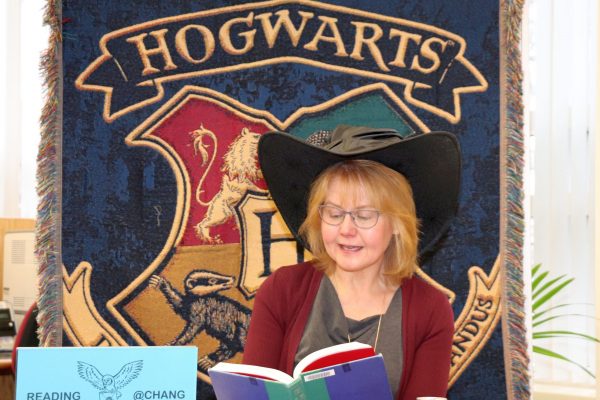
    In the fall of 2019, the Books We Read program officially began with a marathon reading of Harry Potter in Chang Science Library on the Cook Campus, as a partnership among New Brunswick Libraries, the School of Environmental and Biological Sciences, and student groups Rutgers Reads and Muggle Mayhem. The fall semester focused on curating a LibGuide for recreational books available at Rutgers University Libraries and on creating short story discussion sheets for use in recreational reading groups. When the COVID-19 pandemic began threatening campus life, however, the mission to promote recreational reading had to become less reliant on physical spaces and in-person gatherings. A blog post on March 8 marks the beginning of the new initiative, highlighting ebook and audiobook resources available online.

    Shortly after that March 8 post came the project’s first recommended reading list for the pandemic, “Classics for the Coronavirus.” The following weeks have seen more “social distancing” book recommendations, from public health nonfiction for the curious to travel fiction for those feeling cooped up. These recommendations have tried to balance the different motivations people may have for reading at the current time by including texts that deal with disease or isolation as well as texts that allow for a few hours’ escape from reality. After all, reading has traditionally offered guidance, reassurance, or space to process events as well as a way to forget one’s troubles.

    Statistics from our similar initiative at the Rutgers Center of Alcohol Studies Library called R4R @ Rutgers: Reading for Recovery, funded by an ALA Carnegie-Whitney grant in 2015–2016, indicated the possible applications of guided reading in difficult times. Books We Read draws on this experience while scaling up from the specific issues around addiction and recovery to the wide range of needs people may have in a global pandemic. Whatever Rutgers community members are looking for in a book, the Books We Read site aims to help them find it.

    Responding to the popular demand how to find a particular ebook or newspaper article, and wary of the random, dubious ebook download recommendations popping up on Rutgers-related social media and mailing lists, we added a few pages on how to find electronic resources from RUL with a Net ID. Highlighting ebook resources allowed us to showcase the comprehensive LibGuide to electronic resources, while a happy accident prompted us to add a guide to newspaper access.

    The same demand inspired us to incorporate media outside of books, increasing the visibility of the remote resources that Rutgers has to offer for both instruction and fun. Patrons may be surprised to hear that Rutgers allows remote access to some video resources; the site explains how to find them and offers some public health documentary recommendations. No matter the platform, the Books We Read project equips patrons with library resources and empowers them to ask for help.

    Patrons with an artistic flair (or who simply want to stop reading books for a moment and start drawing in them!) are connected through the Books We Read site to Rutgers’ Color Our Collections page, a project of Special Collections and University Archives (SCUA) that allows people to print out and color a curated set of images from the library’s holdings. Coloring archival images and making buttons or magnets from them has been a crowd favorite at in-person library events, and the online link allows users to enjoy the activity from the comfort of their own homes. In addition to fun and recreation, the site also connects users with potential archival resources for remote learning: a new page recommending SCUA resources links readers to the SEBS-specific installment in SCUA’s Archives at Home series, including a video interview.

    A robust social media presence has helped amplify the program’s impact, reaching out on widely used platforms in order to guide and inform online library users adjusting to remote instruction and research. The School of Environmental and Biological Science Office of Communications and Marketing has been instrumental in promoting the site, helping to drive nearly four thousand pageviews and counting in the past month or so of online-only operation.

    Books We Read has proven a successful tool to promote libraries while building connections and communities. Rutgers University Groups Reading Alone Together, in addition to a silly acronym (RUGRAT), captures the paradoxical promise of reading at a time like this: reading is one of the oldest and most effective ways to be alone without feeling alone. The Books We Read program maintains that even without a physical space to gather, the library can still offer, in addition to continuing support for remote learning and research, the simple solace of a good book. Visit us at go.rutgers.edu/booksweread.

    Nicholas Allred and Judit H. Ward

  • Library Instruction Continuity

    The Library Instruction Continuity Resources Guide.

    In light of our “new normal” circumstances, we have created a LibGuide that lists many helpful resources and documentation to support remote instruction.  The Library Instruction Continuity Resources LibGuide includes information on how to conduct live conferencing and record lectures that students may access on demand.  Additionally, it contains links to many helpful University-wide provisions such as direct links to Rutgers Emergency Preparedness for Synchronous/Asynchronous Instruction, and the Teaching and Learning with Technology department.  The guide also contains links to online resources by campus.

    Visit the LibGuide to view all of these valuable resources, and to see how to create and share instructional content in a remote instruction environment.

    For questions about the Library Instruction Continuity Resources LibGuide, contact Maria Breger at maria.breger@rutgers.edu

    View the complete list of the Libraries Teaching & Learning topics.

  • Digital Exhibits Page

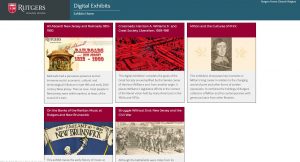
    Continuing the work of presenting our digital projects in a consistent arrangement, the Digital Exhibits page is available with its first five digital exhibitions. The page summarizes the completed projects and links to each online exhibition and its exhibit catalog. While the panels and web pages reflect the distinctiveness of the subjects, they share unified theming. They have consistent links back to the main Digital Exhibits page as well as the Libraries home page. Be sure to check back from time to time, as more are on the way in the months to come.

  • Digital Projects Status Page

    Over the past couple of years, the digital projects team in Shared User Services has been actively assisting campus libraries in organizing their work on digital collections, and making them available online. Thirty-one such projects are now publicly accessible through our digital collections page and span a variety of topics, from Inclusion and Diversity, to showcasing the research articles and presentations of our undergraduates. This list continues to grow, as new collections are proposed and some of our ongoing projects continue to be renewed and expanded upon.

    But everyone wants to know what’s in the pipeline. In order to keep the RUL community up to date on the projects we’re working on, we’ve created a page for Pending and In-Progress Digital Projects that lists most of the digital collections and exhibits that are upcoming, along with their status and proposed work timelines. We hope you’ll visit our status page and keep abreast of our ever-growing digital collections work!

  • Schedule Meetings More Easily with FindTime

    FindTime is an Outlook add-in that allows you to easily identify and come to a consensus on meeting times. FindTime shows you the dates and times you and your attendees are available based on the free/busy data in Outlook calendars. A poll is created within an email message which is sent to invitees who can vote on their preferred times. Because FindTime is integrated into Office 365, you no longer need to use separate applications, such as Doodle, to poll colleagues for meeting times. Invitees do not need to install FindTime to vote on meeting times, and invitations can be sent to any email address including external addresses.

    FindTime works with Outlook on the Web (OWA), Outlook 2016 (desktop version), and Outlook for Mac. When using it for the first time, you will need to install the add-in and you will be prompted to sign in to authorize its use. More information on FindTime can be found here.

    If you have questions about FindTime, please do not hesitate to contact IIS by phone at 848-445-5896, option 7, or by email at support@rulhelp.rutgers.edu.

  • My Trip to Speak at Carnegie Mellon-Qatar

    • Megan Lotts (r.) and her Carnegie Mellon collaborators.

    On February 1, 2020, I boarded a plane with bags full of LEGO as well as Rutgers University Libraries coloring books, zines, and library swag.  My final destination was Doha, Qatar to visit one of Carnegie Mellon’s satellite campuses. I was invited to Doha as the Carnegie Mellon-Qatar (CM-Q) Glorianna St Clair Distinguished Lecture in 21st Century Librarianship and gave a presentation titled “The Engaged Librarian: Fostering a Culture of Creativity and Play in Libraries.” This presentation was based off my previous work on makerspaces, active learning, and play in libraries, as well as new research from my latest book project on creativity for the American Libraries Association, forthcoming in 2021.

    While in Doha, I had the opportunity to collaborate on a zine and LEGO workshop for the CM-Q campus with Jill Chisnell, Dom Jebbia (both from Carnegie Mellon-Pittsburgh), and director of the CM-Q Library Teresa MacGregor. These events were attended by students, faculty, and staff members of the CM-Q campus as well as a few members from the Georgetown University-Qatar community.

    Another exciting part of my trip was the opportunity to present my research on LEGO and active learning at the Qatar National Library (QNL).  This library, recently built by architect Rem Koolhaus, is jaw dropping. Having a soft spot for Koolhaus since reading his well-known text Delirious New York, I immediately fell in love with this elegant sculpture which houses unusual furniture, futuristic technology, and an elevator known as the “people mover,” which is similar to a ride one might find at Disney World in the 1980s.  Beyond the stunning architecture was a variety of unique spaces and resources that cater to the needs of the local Qatar communities, including a large children’s space, a music room, makerspaces, a beautiful café, an impressive auditorium, and more.

    Although there were many interesting cultural experiences while visiting Qatar, including buying goods at the Souq, the Materials Library at Virginia Commonwealth University-Qatar, and trying beef bacon, I was awestruck by the architecture including the QNL (Rem Koolhaus) and the Museum of Islamic Art, designed by world-renowned architect IM Pei. But perhaps most interesting was the architecture of “the Pearl,” an artificial island built on one of Qatar’s former major pearl diving sites. It’s not surprising that this stunning, futuristic, almost unreal structure houses some of the most modern neighborhoods in town. Fortunately, I was able to experience this space in person at a monthly community-building party hosted by Mike Trick, dean of CM-Q.

    If you have questions about this trip or my research, please contact me at megan.lotts@rutgers.edu or learn more about me at meganlotts.com.


  • Quick Takes on Events and News – January 2020

    Targum Documentary Spotlights NBMSA

    Islamic Art Wiki-a-Thon Returns to Dana Library 

    Dana Library hosted its second Islamic Art Wiki-a-Thon last semester. Professor Alex Seggerman’s Islamic Architecture course was one of a group of classes participating in the December 9 Islamic Art Wiki-a-Thon. Students spent the semester learning how to do research and edit Wikipedia pages. They prepared and wrote drafts, updating current Wikipedia articles on various Islamic architecture sites. During the event, they came together and made official changes to articles. They were joined asynchronously by students at Temple University and the University of Texas. 

    On Exhibit at Douglass Library 

    MARY H. DANA WOMEN ARTISTS SERIES GALLERIES
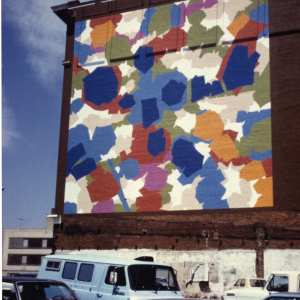
    Gendering Protest: Deborah Castillo and Érika Ordosgoitti
    Exhibition: January 21April 3, 2020
    Curator: Tatiana Flores, Associate Professor of Latino & Caribbean Studies and Art History
    Gallery Hours: M-F 9 a.m.–10 p.m.
    Public Event
    Reception and Artist’s Lecture: Wednesday, March 25 | 5:006:45 p.m.
    RSVP: womenart@cwah.rutgers.edu
    Galleries and event are free and open to the public.
    cwah.rutgers.edu @CWAHatRutgers #GenderingProtest 


  • Special Collections Open House

    You’re invited to an open house at

    Special Collections and University Archives

    Thursday, January 9

    1 – 4 PM

    Alexander Library

    Featuring snacks, demonstrations, and tours.

    RSVP

    Sign up for a tour of our galleries and vast storage areas

  • OneDrive External Sharing

    Beginning on January 13, Rutgers Connect users will be able to share OneDrive files with collaborators outside of the university. Up to this point, external sharing was possible only between authenticated Rutgers Connect users.

    This feature works like sharing with internal Rutgers Connect users. Anyone with access to the shared link will be able to view and edit shared files or folders based on permissions specified by the owner. More information on sharing OneDrive files and folders can be found here.

    If you have any questions about OneDrive file sharing, please do not hesitate to contact IIS by phone at 848-445-5896, option 7, or by email at support@rulhelp.rutgers.edu.