OIT has announced some recent changes and enhancements in Rutgers Connect. We’ve highlighted and described some of them here. Some are already available, while others are currently rolling out to all Microsoft users. Please do not hesitate to contact IIS at support@rulhelp.rutgers.edu if you have questions or comments about these new or enhanced features, or anything in Rutgers Connect.
Outlook on the web (OWA): Update in Accessing Mail, Calendar, People, and To Do
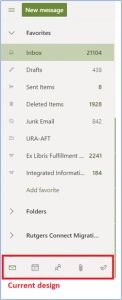
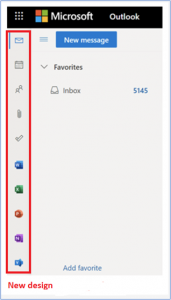
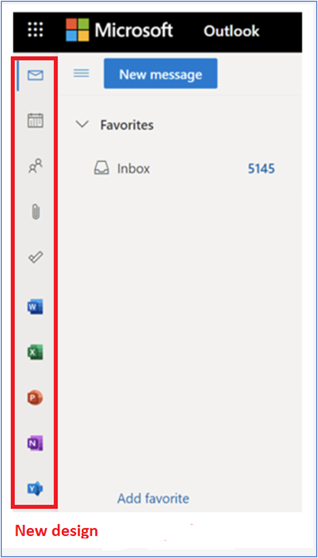
Microsoft is rolling out a newly designed app bar on the left side of the folder pane that will change how users access Mail, Calendar, People, and To Do. The app bar will make it easier to launch Word, Excel, PowerPoint, and OneNote on the web directly from Outlook on the web.
OneDrive: 250GB Upload Capability
Microsoft is raising the upload file size limit of its OneDrive file storage service from 100GB to 250GB. This improvement will allow users to upload files of up to 250GB into OneDrive, Teams, and SharePoint. Please keep in mind that factors such as bandwidth, location, and network capacity may impact large uploads.
Microsoft Word: Text Predictions
Microsoft has begun rolling out a new text prediction feature to speed up the writing of documents written in English. Word will highlight grayed-out predictions when users are writing a document. Suggestions can be accepted using the Tab key or rejected by hitting Escape or continuing to type. The new text predictions feature will be enabled by default but can be disabled if desired. The feature reduces spelling and grammar errors and learns over time to give the best recommendations based on your writing style. Text predictions were previously made available in Outlook on the web where it can also be disabled if desired.
Microsoft Word: Modern Comments
Modern Comments, first introduced in the mobile and Web versions of Word, have been improved based on feedback and are now available in Word for Windows and Word for Mac. Enhancements include improved keyboard shortcuts and @mention notifications and will start rolling out to Windows and Mac users in April. Modern Comments offer enriched collaboration coupled with the ability to assign and resolve comments and respond to @mention notifications via email.
Microsoft Teams: History Menu
Microsoft has introduced a history menu in the Microsoft Teams desktop clients that displays a user’s recently visited locations. By hovering over the backward and forward navigation buttons at the top of the Teams client, users will be able to see recently visited locations in Microsoft Teams. The history menu makes it easier to navigate to previous locations, such as nested tabs and documents.
Teams Meetings: Participants Increased
Microsoft is increasing the limit of participants and chat size in interactive meetings from 300 to 1,000.
Microsoft Teams: New File Sharing Experience
Microsoft is updating the file sharing and access control experience in Microsoft Teams to align with the existing functionality across the other Microsoft 365 applications. When users share a file from within Teams (desktop/web), they will have the option to create sharing links that provide access to people with existing access, people within your organization, and specific people. Before users share a file in a chat and channels, they will be notified if recipients don’t have permission to view the file. The user can change permissions before they share the file (if they have permission to do so). The default file sharing setting for Teams will remain the same and will continue to reflect default permissions in SharePoint, as the two work together.

 The New Brunswick Libraries have partnered with South Asian Studies Program (SASP) in the School of Arts and Sciences, New Brunswick to acquire a membership for the South Asian Open Archive (SAOA) database.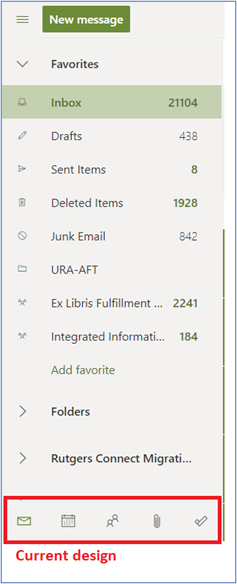


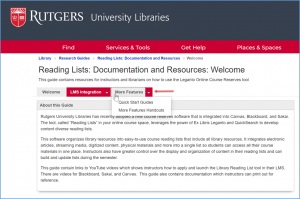 The Reading Lists: Documentation and Resources LibGuide has been updated to include another page that describes additional functionality. New content includes a quick start guide as well as printable handouts. Liaisons can share this information with course instructors whether their courses are in Canvas, Blackboard, or Sakai.
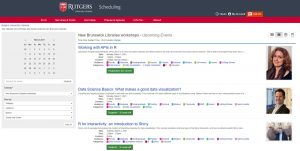 In the September 2020 issue of “The Agenda,” we wrote about the numerous modules of Springshare’s LibCal software that are in use at RUL. This month, we’ll give you an overview and update on one of those modules, LibCal Events, and how it can be used.