Category: Department

  • New Resources from the Communications Department

    The following resources are now available on the communications department website. We hope you find them useful. We’re trying to actively identified shared resources that we can supply to save our colleagues time and to create a cohesive visual identity for our libraries. If you have suggestions of new projects, please let me know.

    New signage templates:

    During our last signage inventory, we tried to identify signs that appear in multiple libraries, and we’ve added a bunch of new templates to the signage library. We now have some templates for quiet and collaborative study areas, guest and Net ID computers, reshelving books and shelving carts, and keep your belongings safe.
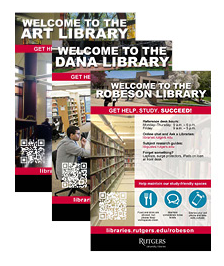
    We also have Welcome to the Library signs prepared for all public library spaces (except for the Annex, which we will get to soon). These are available in two sizes – 24” x 36” large posters, and 8.5” x 11” in landscape and portrait orientation.

    In the signage section, you will also find our policy sign toolkit, including icons for policy signs and welcome signs, and build your own signage templates. If you make a sign that might be useful for other libraries, please send it to us and we’ll post it in the sign library so others can access it.

    link: https://apps.libraries.rutgers.edu/communications/signage-templates

    Powerpoint templates:

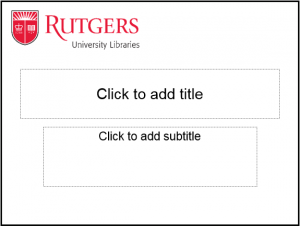
    Complete Powerpoint templates, featuring the new shield logo, are now available. Please do not use the older Powerpoint templates with the Rutgers seal. The Rutgers informal seal is no longer part of the university’s visual identity and we should be using the shield wherever possible. There are two versions of the template – an all-white version, and one with a scarlet band. These templates include title pages and sub-pages and also have a color theme that includes Rutgers colors.

    To edit the Optional Presentation Title area on the slide, go to “View,” select “Master,” and then choose “Slide Master.” You will then be able to double click on the Optional Presentation Title text and edit the area. The template must be resaved before creating a presentation.

    To select the Rutgers color theme, go to “View,” select “Master,” and then choose “Slide Master.” Select Colors and scroll down to select Rutgers University Libraries under the Custom subheading.

    link: https://apps.libraries.rutgers.edu/communications/visual-identity-resources

    Video branding elements:

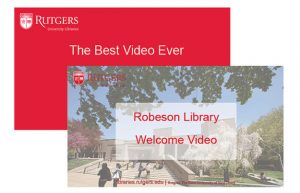
    Video branding elements are also now available for you to use. These should be used in any video you make that promotes Library services, spaces, or resources. It is very important that the branding is used because it will make us compliant with the university visual identity policy for video standards, create greater visibility for the Libraries, and acknowledge our ownership of this material (very important when videos are being repurposed, embedded, or linked to from other users).

    The visual identity policy for video standards is:

    The Rutgers logotype, with or without a signature, must appear prominently at or near the opening or closing of a Rutgers video. In addition, the appropriate Rutgers name (i.e., Rutgers, The State University of New Jersey; Rutgers University–New Brunswick; Rutgers University–Newark; Rutgers University–Camden; Rutgers Biomedical and Health Sciences) must appear somewhere in the course of the video.”

    **Please note: we should use the full university name, “Rutgers, The State University of New Jersey,” and not a local university name since the libraries are a central unit.

    The Communications Department is supplying four branding elements that can be personalized to some extent, depending on your project:

    These branding elements can be mixed and matched, appear at the beginning or the end of your video – just so long as you are compliant with the visual identity policy quoted above. If you have a special video project or series and would like a tailor-made branding element, please let us know. We’re happy to work with you to accommodate these requests.

    link: https://apps.libraries.rutgers.edu/communications/visual-identity-resources

    Revised Rutgers University Libraries editorial style guide:

    The Libraries’ style guide has been updated to address issues particular to the Libraries that are not covered in the university’s guidelines and to offer quick tips for remaining consistent with the established Rutgers style. Our goal is to foster clear, consistent messaging in all of the Libraries’ official communication channels, including our website, blogs, social media, print and electronic newsletters, brochures, flyers, and so on. It is not intended to supplant the style guidelines of any academic journal or news outlet to which you may be contributing material.

    link: https://www.libraries.rutgers.edu/rul/staff/pub_serv/procedures/stylesheet.shtml

    Save

    Save

    Save

    Save

    Save

    Save

    Save

    Save

    Save

  • Where in the World is Shared User Services?

    Where in the World is Shared User Services?

    Nearly a year ago, the Libraries reorganized to form a central user services unit, Shared User Services. While we are still building, major structures are coming together. Here’s a progress report to let you know who we are, where you can find us, and some of the things we are up to.

    SUS began with several people in the former Scholarly Communication Center department: Isaiah Beard (Digital Data Curator), Ron Jantz (Digital Library Architect), Peter Konin (Digital Project Coordinator), and Rhonda Marker (Director of Shared User Services). Marty Barnett (Digital Library Applications Specialist) moved from IIS to join us. This summer, Joseph Deodado (Digital User Services Librarian) and Amy Kimura (Web Services Librarian) came on board. We are currently recruiting for a new Virtual Reference Services Librarian.

    Our physical work home is in Alexander Library on the 4th floor. Our online home is on the Staff Resources pages of the Libraries website. We have an up to date SUS Contacts list where you can see who to contact, from digital curation and digital file questions (Isaiah Beard) to virtual reference services (currently, Joseph Deodato and Natalie Borisovets). No, Natalie has not moved to SUS. She is still at Dana Library, where she has been the glue holding together the chat reference schedule across all of RUL. When we hire the new Virtual Reference Services Librarian, we’ll update our contacts list.

    SUS coordinates discovery, the shared components of reference (chat, email), and the public-facing libraries website. We also have a coordinating role for digital projects – but that story will have to wait for a future issue of The Agenda. Two working groups that support improvements to discovery of library resources, the Discovery Working Group and the Library Catalog Committee, report to the Head of Shared User Services. Their minutes and other useful information are now located on the SUS web pages of Staff Resources. Cabinet recently charged the Web Improvement Team, which is ambitiously meeting on the first day of the fall semester. We are all looking forward to seeing the fruits of their labors – and you will be able to read all about it on the SUS web pages.

    From time to time, the Libraries identify other services that call for a central user services role. This was the case for the modernization of our library hours information. Staff in SUS and IIS collaborated on configuring the information in LibCal (from SpringShare) and worked with many people in all our library locations to assemble the details of buildings, service points, and shifting calendars. We could not have done it without you. We are still adding details and features so that this new way of presenting our library hours gives our users the information they need. Ongoing support for library hours resides in SUS (Marty Barnett).

    There is a lot more that we are doing, and we are excited about the work ahead of us. Most of all we look forward to working with all of you in the Libraries. If you ever want to chat, now you know where to find us!

    Save

  • Fellows Learn Jazz and Archives in Institute Program

    • 2017 Institute of Jazz Studies Fellows, from left, Ana Niño, Jeannie Chen and Adam Berkowitz, tour an exhibit at the National Jazz Museum in Harlem. Leading them through Harlem jazz history is Ryan Maloney, a former employee of the Institute and director of education and programs at the Museum.

    Three archives students from across the country, each with strong musical backgrounds, undertook to learn jazz as a second language as they burnished their archival credentials from the classroom in an intensive two-week program at the Institute of Jazz Studies (IJS) this past June. They were the fifth class of Jazz Archival Fellows, a program underwritten by Jon Van Rens, a longtime IJS supporter and administered until earlier this year by the late Ed Berger, the previous IJS associate director.

    The selected candidates who came to Rutgers University-Newark were:

    • Ana Niño, a student at the University of North Texas who works in a Dallas-area library and plays guitar in an all-female rock band.
    • Jeannie Chen, a student at UCLA who has a background in classical piano that propelled her into international piano competition
    • Adam Berkowitz, a MLIS student at University of South Florida in Tampa who is also a professional percussionist interested in jazz and classical music and music educator with a special interest in Jewish musicians and composers.

    During their time at IJS, they arranged, described, and produced a finding aid for over 400 taped interviews with jazz musicians and other figures on the jazz scene designated as the Institute of Jazz Studies Collection of Jazz Oral Sound Recordings. Materials in the collection were made between 1956 and 2007 and include mostly audiocassettes and some reel-to-reel tapes.

    Field trips afforded the fellows a glimpse of how other area repositories and museums conduct their work. These trips have proven to be one of the more popular features of the fellowship experience, and this year was no exception. The fellows visited the Louis Armstrong House/Archive, the National Jazz Museum in Harlem, the New York Philharmonic Archives, the Carnegie Hall Archives, and the Thomas Edison National Park in West Orange.

    In addition, Niño, Chen, and Berkowitz received an overview of issues in managing oral history collections from Dana Library’s digital humanities librarian Krista White. Archivist Elizabeth Surles spoke on rudiments of Encoded Archival Description (EAD), a program utilized to post archival finding aids on the web. IJS archivist Angela Lawrence also worked closely with the students as they processed the interviews.

  • Performance Evaluations for Nonaligned Employees

    The FY 2017–2018 performance evaluation process for nonaligned employees (MPSC and Senior Administrators) is nearly upon us!

    The appraisal period is from July 1, 2016 through June 30, 2017. MPSC employees should ready their self-appraisals and share with their direct supervisors. Supervisors should review self-appraisals, complete the formal performance evaluation form, and discuss the completed form with the second-level supervisor.

    Additional details will be forthcoming. Questions on this process should be directed to the Libraries’ HR Office.

  • Tips for videography; promotional items inventory; new signage templates from the Communications Department

    Tips for videography; promotional items inventory; new signage templates from the Communications Department

    promotional item samplesThe communications department has made some more useful items available on our website.

    A promotional item visual inventory. This website lists all the promotional items we currently have in stock. Many of these items are available in limited quantities, for Libraries events. To place a request, please send Ken Kuehl an email with the quantities, item names, what they will be used for, and an address for shipping.

    Helpful Hints for Videotaping Interviews. This Microsoft Word document contains some tips and tricks for planning for and improving the visuals of taped interviews. We hope this is helpful to anyone planning to record video for the Libraries. It is listed on the Communications Department website.

    New signage templates. On our signage template web page, you can download Word files that you can update with your library’s information (name of library, URL, specific text, images) and print in black and white or color. We will work on converting them to Powerpoint over the next month. We’ve added the following to the Shared Sign Library:


    • Allow Us to Reshelve Your Books
    • Please Do Not Reshelve Your Books
    • Keep Your Belongings Safe
    • Please Bring Your Own Change

    sample policy sign imageWe’ve also added a Policy Signs and Toolkit. During our recent signage inventory, we saw lots of individual policy signs posted all over the libraries. These new Policy Signs and Toolkit will allow you to create signs that address multiple policies in a single page and hopefully eliminate the need for multiple single policy signs. The toolkit includes a vertical and horizontal version of this sign and a zip file of icons (hopefully live by the time this newsletter publishes) to use for signage.

    We have more signage templates on the way, including staff only and a replacement for the popular Can’t Find a Book signs. Stay tuned.


    Save

  • Social Media Summit 2017

    Social Media Summit 2017

    Social Media Summit image

    10 a.m. Introductory Presentation. The Social Media Task Force will lead a discussion of their work over the last year and the resultant social media guidelines and process.
    11 a.m. – 12:30 p.m. Round Table Discussions. Share your thoughts and experience in small group discussions. Moderators will then present findings to entire summit. Table topics include “Using social media to promote research,” “Creative social media ideas for libraries,” “Resources and strategies for finding great content,” “Promoting library services & resources via social media,” and “Best practices for interacting with users.”
    12:30 – 1:15 p.m. Lunch. Network with your colleagues over sandwiches and salads (provided).
    1:30 – 2:15 p.m. Workshop. Dory Devlin, University News and Media Relations, will demonstrate how to manage multiple accounts using tools like Hootsuite and Tweetdeck.
    2:15 – 3:00 p.m. Panel Event. Social media managers from other university departments will describe challenges and opportunities in assessing, serving, and growing social media audiences. Panelists will include Stefanie Charles, Rutgers–Camden, Brice Hammack, Rutgers University Press, and other Rutgers communications specialists. Panel will be moderated by John Brennan.

    Open to faculty and staff of Rutgers University Libraries. RSVP: go.rutgers.edu/prax7fo0


    Save

  • Visual Identity Resources from the Communications Department

    Examples of signage templates that are available online in Word and Powerpoint. Users can modify the text and image to fit their needs.

    The central communications office faces a unique challenge. While we are tasked with improving the appearance of the signage and marketing materials used at the Libraries, we recognize that these signs must serve local needs and be tailored for local use. It is not always feasible for the communications department to create these local materials, so we must by necessity focus our efforts on providing resources and templates to make it easier for our colleagues to quickly and easily produce professional materials that fit with the Libraries’ and the university’s visual identity.

    Recently, we have expanded our visual identity resources to include a new logotype with the Rutgers shield, updated letterhead, and updated and expanded signage. To find these materials, navigate to the Staff Resources section of the website and click Marketing in the right menu. You should also review the revised visual identity guide for the university to learn how to use the shield logotype.

    We will continue to expand these toolboxes and add new resources (I have asked the university for a powerpoint template which I know would be useful to many of you). I also anticipate adding additional downloadable materials–brochures for undergraduate students, alumni and guest borrowers, graduate students, faculty, special collections and university archives, and more–in the coming weeks. This is a good time to reach out if you have an older brochure that needs updating or have a new service/information to promote.

    Signage Update

    At a recent cabinet meeting, I presented findings from a signage inventory the communications department undertook in March and April of this year to assess progress. The percentages of templated signs in the libraries range from 1% (Smith Library*) to 27% (Robeson). This inventory was our mid-year assessment of a year-long project (approved by Cabinet in September 2016) to implement new sign templates.

    As a result of our signage inventory, we are making new print-and-go signs to cover common needs—things like “Staff Only” to “Don’t Reshelf Books.” We plan to create two new templates each week through the summer. We also created “Welcome to X Library” signs for each library location that will soon be posted to the website that make it easy to post hours, policies, and additional information at entrances. Lastly, we are now providing templates in both Word and Powerpoint to accommodate users who prefer to work with Powerpoint.

    Our goal is to make signage templates that are easy to use and useful throughout the libraries—but we need your help. We are working to identify new signage needs, but we hope you will also share signs you design for your location so we can crowd-source signs that may be useful to others in the Libraries. If you use the template to create a sign that should be included in the signage library, send it to the communications department. We would also like to hear from you about your experience with the signage templates—what worked? What didn’t? What would make this work better for you? Please email Jessica Pellien with your feedback and suggestions.

    * Important to note that they have subsequently converted almost ALL their signs to the templates.

  • Rutgers Launches Rutgers Health – Here’s What It Means for the Libraries

    Rutgers Launches Rutgers Health – Here’s What It Means for the Libraries

    What is Rutgers Health?

    “Rutgers Health is the clinical arm of Rutgers–the areas of Rutgers Biomedical and Health Sciences and other Rutgers units devoted to caring for patients. A single brand for all of Rutgers’ patient care and services.” (from: www.rutgershealth.org/about-rutgers-health/rutgers-health-structure)

    The Rutgers Health Group will serve as a single faculty practice, unifying existing specialties and clinical practices, comprising approximately 1,000 Rutgers-employed health care professionals. Members of the faculty practice will be from New Jersey Medical School, Robert Wood Johnson Medical School, and other RBHS and Rutgers schools–dentists, nurses, pharmacists, social workers and psychologists, and other health care professionals working in clinical settings throughout New Jersey.

    The Rutgers Health Network will be an integrated network of Rutgers’ affiliated hospitals, community clinics, medical groups, wellness centers, and other affiliates collaborating to provide value-based care to patient populations across the state.

    How will the Rutgers University Libraries support Rutgers Health?

    There are two major user groups with full access to library resources–members of the RBHS faculty, students, and staff and members of the clinical (voluntary) faculty who oversee students and residents in affiliated hospitals and clinics throughout New Jersey.

    As Rutgers Health launches, it is challenging to predict how utilization and demand for libraries-licensed high quality clinical and patient care resources will grow. Should you encounter questions about Rutgers Health which impact the libraries, please contact your colleagues at the RBHS Libraries.


    Contributed by Judy Cohn and Victoria Wagner

    Judy CohnSave

    Save

    Save

    Save

  • Summer AuthorTalks Return to Alexander Library

    • Tisha Bender P.U.N.C.H. AuthorTalk, June 2016

    We are happy to announce that the Libraries are once again collaborating with Rutgers’ Office of Summer and Winter Sessions to cosponsor a series of talks at Alexander Library this summer. Save the following dates and stay tuned to the Agenda and our website for more information on the talks as they approach. We hope you will share the word with colleagues and students and plan to join us yourselves!

    Azzan Yadin-Israel, Professor, Jewish Studies, Rutgers–New Brunswick
    The Grace of God and the Grace of Man: The Theologies of Bruce Springsteen
    (Lingua Press, July 2016)
    Thursday, June 29, 4–5:30 p.m.

    Bruce Springsteen’s words and music have been part of the American landscape for nearly half a century, and are today cherished by millions worldwide. Indeed, Springsteen has been known to inspire religious devotion among his fans, and his shows with the E Street Band are often compared to a revivalist congregation. However, there has not been a comprehensive scholarly study of the biblical and theological motifs in Springsteen’s lyrics until now. Reading Springsteen’s songs as one would a poem, The Grace of God and the Grace of Man sheds new light on Springsteen’s work.

    John Bader, Former Dean of Academic Advising and Undergraduate Academic Affairs, Johns Hopkins University
    Dean’s List: 10 Strategies for College Success
    (2nd ed., Johns Hopkins University Press, March 2017)
    Thursday, July 6, 4–5:30 p.m.

    Deans at America’s top institutions—including Harvard, Princeton, Stanford, Yale, and Columbia—join John Bader to tell students what they need to know to have a rich and rewarding college experience. A complete reworking, this second edition includes information on managing workloads and faculty relationships, as well as new material focused on first-generation challenges and international students. Dean’s List offers a thoughtful, commonsense approach to higher education that allows students to make the most of their four years on campus—and beyond.

    Third talk TBA. More information coming soon!

  • Year End Carryover Accrual Review For Employees Who Accrue Paid Time Each Month

    Employees that are eligible to accrue paid time off should review year-end carryover accruals and discuss with supervisors to use excess vacation time prior to the June 30, 2017 deadline.  Staff may carry over one year accrual plus the time accrued for the month of June. ARS Administrators are strongly encouraged to review and insure that absence records are up to date as we get close to year end. Prior to approving time off supervisors may want to confer with the unit ARS administrator to confirm the accuracy of employees accruals.

    In accordance with University Policy 60.3.14, all earned compensatory time must be used prior to the first pay period in June; comp time not used by the first pay period in June will be paid out as overtime by the end of the fiscal year.

    Depending on specific negotiated agreements and university policy, excess vacation may be donated to the Compassionate Leave Program or the Staff Leave Donation Program for legacy UMDNJ.