The website redesign project team is close to completing baseline usability testing, examining how student and faculty users complete common tasks on our site. Through this study, we’re gaining a better understanding of where usability problems lie and how we should prioritize and present various pieces of content on the site. Listening to users speak their thought process aloud is very enlightening, allowing us to learn a lot about their site usage and perceptions even beyond the steps they take to complete the assigned tasks. We’ve even learned a bit about what we’re doing right!
As with the brand and messaging survey, we were happy to see a huge amount of interest in usability testing across units and user communities, and we’ve gathered a lot of valuable data that is steering how we move forward with the design of each site. We’ve also gathered a pool of people who were unable to participate in this study but are interested in being involved in future studies, which will make our next outreach efforts more streamlined.
Local Library Owner groups are currently meeting with NewCity to workshop some prototype ideas, informed by analyses of all the discovery and audience research data gathered to date: stakeholder interviews, analytics, brand and messaging workshops and surveys, and usability/perception testing. These prototypes are just pen-and-paper outlines so far; NewCity will take a lot of inspiration and ideas from them, then will develop some more detailed and concrete options for us to explore. Over the course of the fall semester, we’ll get a real sense of how the sites are going to look and function, and content development will begin.
We’ll be presenting at a central forum sometime early in the fall semester, so look out for an announcement about a date and time for that presentation.
The HathiTrust Emergency Temporary Access Service (ETAS) provides digital access to a significant portion of our titles held in print during temporary and involuntary disruptions to normal library collections services. The COVID-19 pandemic has changed how patrons access and use library collections; to align with state recommendations and promote public safety in our library spaces, users are currently unable to freely browse and borrow from our physical collections. These restrictions allow us to offer a digital replacement for our print copies from the HathiTrust repository. Access to these titles is based on our print holdings and because the digital access offered by HathiTrust is provided in lieu of our print items, we cannot circulate both “copies” simultaneously to comply with copyright. For this reason, personal delivery and click and collect request options are not available for items with full text electronic access.
Compliance with copyright also informs some of the features of the HathiTrust ETAS reading experience. Users must “check out” the digital copy for a short period of time to access. This provides a controlled experience that restricts the number of simultaneous users. When users are done browsing the item, they have the option to return the item right away to free it up for other users or to retain the checkout for a period of time. The material will automatically renew during active use and expire after 12 hours of inactivity. After an hour of inactivity, the title becomes eligible for new checkouts but will continue to default to the initial user if there are no checkout requests from other users. Users cannot print or download from materials held in the HathiTrust ETAS, but these items are eligible for chapter scanning and interlibrary loan.
HathiTrust ETAS provides safe and immediate access to many of our print titles during our temporary service disruptions. Rutgers is periodically reevaluated for access to the HathiTrust ETAS and we will no longer be eligible for this service once users are able to freely access services and collections.
Now that the final version has been posted publicly to our website—you can find them here or by navigating to About > Mission, Vision, & Strategic Plan on the Libraries’ homepage—I wanted to take some time to discuss the changes that Cabinet made.
You will see that this document is not considerably different from what was initially recommended to us by the Values and Principles Taskforce. However, we thought it was important to add some prefatory remarks to describe the function of these values and principles within our organizational culture and explain the order in which they are listed:
Rutgers University Libraries’ values and principles inform our efforts to support and enrich the instructional, research, and public service missions of Rutgers University. Our values represent our core beliefs, while each of the supporting principles describes how these values can and should be manifested in our day-to-day work. Serving as a compass to guide our interactions and decision-making, these elements differ from our annual priorities, which describe the “what” of our work rather than the “how” and “why.” We also acknowledge the difficult truth that not all of these values fully reflect our current reality. For this reason, we have chosen to foreground our commitment to Diversity, Equity, and Inclusion in recognition that we must do more to create a workplace that embraces individuals with a diversity of backgrounds, identities, and roles. Moving forward, we pledge to strive toward these standards of thought and behavior so that we may become an organization distinguished by a culture of fairness, respect, and opportunity for all.
From the perspective of our leadership group, it is especially helpful to have these values and principles in place at this moment, when we are tasked with making difficult decisions related to budgetary reductions while continuing to provide excellent library service, all despite the challenges and uncertainties of the ever-shifting environment created by the pandemic. With this document as our “North Star,” we can continually look inward, examine our thoughts and behaviors, and make sure we are living up to the standards we have formally set forth.
We should also not shy away from the fact that these values and principles are in some ways aspirational, particularly when it comes to our commitment to Diversity, Equity, and Inclusion. While we have made some strides in this area over the years through various programs, policy changes, and other activities, there is still work that remains to be done. Acknowledging our current situation is an important first step for us, as is the work that will be undertaken by the newly formed DEI Committee.
Please do take the time to read back over these values and principles and reflect on how they can be brought to bear on your own day-to-day work and in your interactions with patrons and colleagues. Remember, as an organization, we have all contributed to the development of these ideals—and it is now our shared responsibility to collectively embody them.
As I’m sure you’ve seen in your email or the Cabinet minutes, the Libraries’ Values and Principles Taskforce recently completed its work and issued a final recommendation to Cabinet for consideration. We are still in the process of finalizing our values and principles and will post them to our website soon—but in my mind, this work could not have come at a better time, as the COVID pandemic, the shift to online-only, and now, planning for the phased return to our buildings, have all forced us to take a step back and determine what is core to library service.
Our values and principles are different from our goals and priorities. The latter identify “what” we do, while the former describe the “how” and “why.” When these are finalized, we will have a set of ideals that we can use to guide our decision-making in the future—and in some ways, they have already begun to do so. For example, at the last Cabinet meeting, during which we discussed the taskforce’s recommendation to us, we decided to move the value of Diversity, Equity, and Inclusion (DEI) to the top of the list. This was a recognition of the importance of this value to us as a leadership group and an organization, as well as an acknowledgment of the reality that we have work to do in this area. Our first step forward is charging a new Diversity, Equity, and Inclusion Committee, which will take stock of our current environment in order to guide and recommend processes within the Libraries that embrace DEI. As a reflection of our ongoing commitment to this value, the DEI Committee will be a permanent group designed to provide continuing guidance on these issues, not a working group tasked with producing a single report or planning a one-off training.
Of course, this is only one example of how our values and principles can serve as a compass for us. Moving forward, we should consistently refer to them as a guide when there are hard decisions to make or difficult conversations to have. When we embrace these values—DEI, Inquiry, Access, Service, and Collaboration—with the intent of truly living them, we can be confident in our ability to move forward in a way that meaningfully advances the missions of the Libraries and the university.
I would once again like to thank the members of the taskforce—Mina Ghajar, Tom Glynn, Samantha Kannegiser, Elizabeth Surles, and Geoffrey Wood—for their extraordinary work. Their job was certainly not an easy one, and the way in which they sought input from faculty and staff across the Libraries was admirable. I encourage you to review our values and principles once they are posted and reflect on how you can embody them in your own day-to-day work.
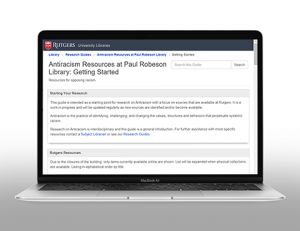
Antiracism is the practice of identifying, challenging, and changing the values, structures, and behaviors that perpetuate systemic racism.
Antiracism LibGuide
A new guide created by Katie Anderson highlights resources for research on antiracism with a focus on sources that are available at Rutgers.
Antiracism is the practice of identifying, challenging, and changing the values, structures, and behaviors that perpetuate systemic racism.
Included in the guide are recommended authors, ebooks, and reading lists; background information on the Black Lives Matter movement; links to podcasts and media; and other antiracist resources. It also features a section with historical material on Rutgers alumnus Paul Robeson, the namesake of Paul Robeson Library who is remembered for his antiracist activism.
Summertime, and Summer SAPAC is here in its shorts and flip-flops to give you a low-key forum to share your research, practical solutions, and fizzy ideas with your fellow RUL librarians, or at least their virtual avatars and disembodied heads.
Got a research project, at any stage of development, that you would like to share with a friendly audience? Did you miss a chance to present at an in-person conference this spring? Would you like to organize a panel discussion? Perhaps you’d like to share your knowledge on a professional development topic, or workshop an idea you’ve had about how we’ll provide services next year? Maybe try something out in a smaller and less formal group before taking it to an NBL-All or RUL Faculty Forum?
If so, the Scholarly and Professional Activity Committee wants to know! We’re looking for presenters for the rest of the summer. We don’t need to limit ourselves to once a month, so the more the merrier. We anticipate scheduling these at lunchtime early in the week.
Please send your title, abstract, and top three preferred dates to the committee members below. We’ll schedule and announce them as they come in!
Janet Brennan Croft, co-chair till June 30
Bart Howard Everts, co-chair till June 30
Fobazi Ettarh, 2019-2022
Laura Costello, 2018-2021
Amy Kimura, 2018-2021
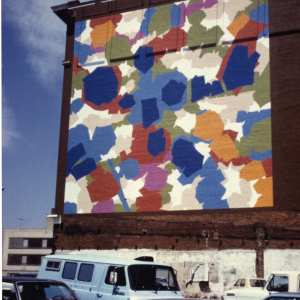
Dorothy Gillespie (1920-2012) was an abstract sculptor and painter whose archives are part of the Miriam Schapiro Archives on Women Artists at Special Collections and University Archives. Born in Roanoke, Virginia on June 29, she attended the Maryland Institute College of Art in Baltimore. Moving to New York City in 1943, she continued her studies at the Art Students League and at Atelier 17, a printmaking studio that emphasized experimentation. In 1946 she married Bernard Israel, and subsequently had three children. Soon afterwards, she began painting in a completely gestural style influenced by Abstract Expressionism. In the 1950s, she and her family moved to Miami, Florida, where she secured group exhibitions and a solo exhibition at the Miami Museum of Art in 1962. As a young married woman, Gillespie encountered discrimination in the art world, finding herself labeled a “housewife painter.” These early experiences helped raise her consciousness as a feminist.
In the mid-1960s, Gillespie and her family moved back to New York City. Gillespie’s use of oil paint began to diminish as she experimented with paper, pastels, and acrylic. The Gillespies owned Gallery Champagne, a champagne nightclub located in Greenwich Village, which provided a space for Gillespie to display her art. In the 1970s, Gillespie became involved in the feminist art movement. She organized exhibitions, created a collection of women’s art, compiled statistics, and took part in protests against galleries. The bright and whimsical style of her sculptures created various public art opportunities for her in the 1980s. In the 1980s and 1990s, she donated many pieces from her own art collection, as well as her own artwork, to various universities in order to create university art collections.
Since her death in 2012, her son Gary Israel has been dedicated to preserving her legacy. This digital project, which foregrounds a selection of images of Gillespie’s work, was made possible by a generous gift from the Dorothy M. Gillespie Foundation. The donation funded two students from the Douglass Residential College, Talia Lang and Ana Couto Barbosa, to scan and create metadata for the images in Summer 2019.
Couto was inspired by the project to pursue a degree in library science: she will begin the Master of Information program at Rutgers in September. “During this experience, I learned about digitization, metadata, archival standards, and the importance of information organization. The internship opened my eyes to the vastness of library science and its career opportunities,” she said.
The Dorothy Gillespie digitization project will resume next summer. We would like to express special thanks to Isaiah Beard, Geoffrey Wood, Marty Barnett, and Sam McDonald for helping make this project a reality.
Diane Biunno is metadata archivist for the Institute of Jazz Studies.
Diane Biunno joined the Libraries as metadata archivist for the Institute of Jazz Studies back in February. Here, we catch up with her to learn more about her experience and what she has been working on since the shift to online-only service.
Tell us a bit about your background prior to coming to Rutgers.
Prior to joining the team at the Institute of Jazz Studies in February 2020, I served as a project archivist at the Historical Society of Pennsylvania (HSP) in Philadelphia. At HSP I worked on several projects including the Hidden Collections Initiative which was a grant funded project to improve the accessibility and discoverability of archival collections housed at Philadelphia-area small repositories. As part of the initiative, I helped staff and volunteers at local historical societies, ethnic organizations, and religious institutions better arrange, describe, and care for their collections. I enjoyed working on this project because it gave me an opportunity to get to know members of the local archival community and their amazing collections.
Before coming to Rutgers, I also worked on several innovative digital projects that were focused on improving the discoverability of archival and special collections materials. For example, I served as a digital project assistant at Penn Libraries for the Bibliotheca Philadelphiensis project, an initiative to digitize and make freely available all the known medieval manuscripts in the Philadelphia region. In addition, I was a digital project associate for the Historical Images, New Technologies Project, which explored how to better describe archival visual materials using TEI (Text Encoding Initiative) markup. Through working on these projects, I learned a great deal about metadata standards and formats, as well as, digital preservation and digital project management best practices.
I received my B.A and Ph.D. in Italian from Rutgers University and my Master’s in Library & Information Science from Drexel University in Philadelphia, Pennsylvania.
What have you been working on during the quarantine?
I’ve been working with my colleagues at IJS to copyedit and publish the approximately 200 finding aids that the IJS created last year. A finding aid is document that describes an archival collection and helps guide researchers in using the collection. The IJS finding aids will be published online and made accessible to the general public and researchers, with the goal of helping our patrons better understand our collections and how our materials can meet their research needs.
What does the process look like?
Before beginning the process of copyediting the finding aids, we quickly realized that we needed a style guide to ensure that all finding aids would be edited according to the same capitalization, punctuation, and grammatical guidelines. Unfortunately, there isn’t a standard style guide for archivists, so we decided to create our own and base it on the Chicago Manual of Style, a style guide widely used in academic publishing.
Next, we created project workflows, as well as spreadsheets for keeping track of the project’s progress. We made sure to keep the project style guide, spreadsheets, and other documentation in a shared folder that was easily accessible to everyone working on the project. Most importantly, used software tools that allow us to easily track changes to documents and to view the edits of our coworkers in real time.
How far along are you and what are the next steps?
At this point, we are halfway through the project and have published approximately 110 finding aids. We’re moving at a steady pace and hope to wrap up the project in a few weeks.
While working on the project, I began thinking about how the IJS might use Wikipedia to help guide researchers and the general public to our collections. Because patrons use Wikipedia as a starting point to find general information on a topic, as well as, additional resources, I’ve begun adding links to the institute’s finding aids in the “External Link” section located at the bottom of Wikipedia entries. For example, at the bottom of the Benny Goodman Wikipedia entry, I’ve added a link to the IJS finding aid for the D. Russell Connor collection of Benny Goodman audio recordings. Moving forward, I hope to add additional links to our collections and explore other ways to make our finding aids and collections more broadly accessible to the public.
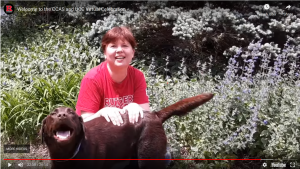
Regina and her dog from the CCAS and UCC Virtual Celebration
Now that library services have moved online, the faculty and staff of Paul Robeson Library continue to stay visible on campus by contributing to various virtual initiatives at Rutgers University–Camden.
During the spring semester, reference and instruction librarian Zara Wilkinson partnered with the Communications Office to share helpful tips on using the library with the campus community (Student Tips for Navigating Online Research Resources and Services) and prepared a video to be provided to newly-admitted students via the Admissions Office. Samantha Kannegiser, student success librarian, John Gibson, instructional technology specialist, and Regina Koury, library director, joined other Rutgers–Camden faculty and staff in a virtual welcome sent to incoming students in honor of National Decision Day and a video congratulating the Camden Colleges of Arts and Sciences and University College–Camden Class of 2020 graduating students during virtual commencement.
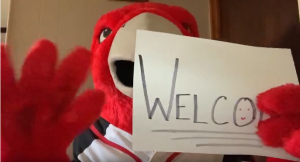
The Scarlet Raptor in a virtual welcome in honor of National Decision Day
Library support for virtual campus initiatives will continue into the summer. Raptor Welcome, the annual new student orientation, is moving online and will include a video starring Reference Librarian John Powell, which was created in 2019 in conjunction with the Student Success Coach Office. Samantha Kannegiser has also created an online orientation for students in the Summer 2020 Educational Opportunity Fund Summer Institute and is working on library instruction videos for summer classes that cannot meet in person.
All these efforts help to build new and strengthen existing campus and community partnerships to market and promote library services, resources, and events.
Over the past few weeks, the web redesign team and the local library owners have been hard at work developing and deploying an audience research plan in collaboration with NewCity. A brand survey specific to each campus was widely distributed to faculty, staff, and students. The survey asked participants to choose words and images that best represent their library, and to reflect a bit on why they made those choices. We were thrilled to receive over 2,000 responses, along with a lot of thoughtful feedback that will help us make design decisions that are driven by local values and priorities.
Baseline usability testing was launched at Camden earlier this week and will be conducted over the next few weeks at RBHS, New Brunswick, and Newark. The usability study is looking at how users reach our site and complete common tasks, and also asks some more general exploratory questions that will help us understand how local sites might most effectively convey local information along with access to centrally provided resources. The studies differ slightly from unit to unit, depending on what the local library owner groups have defined as the most important tasks for their key stakeholder groups. Given this baseline information, we’ll be able to measure whether user perception and performance around these key tasks have improved during development and after launch. We’ll be sharing the results of our audience research before too long.
Through content analysis and interviews, NewCity has been digging into the ways content “happens” on our site. As a complex organization with many moving pieces and a vast amount of information to provide to a diverse body of users, content governance is a major challenge. This is going to be one of the most important aspects of the redesign: not just the site itself, but the development of a manageable, logical governance model that will enable us to maintain content that is accurate, fresh, and engaging.
Once the audience research data has been analyzed, the local library owner groups will each meet again with NewCity to synthesize the results and begin workshopping ideas, informed by the brand survey and usability studies. If you’re interested in contributing to the work around your unit’s aspirations for a new site, please check in with your project team representative. They can provide access to a virtual whiteboard where we’re tracking thoughts about values, impact, audiences, and success measures. The information gathered there will be wrapped up into the workshops later this summer.